Virtual table tennis
[Spring 2025] To design and develop an immersive, gesture-controlled two-player table tennis game on VGA with real-time sound feedback and intuitive glove-based play using the Raspberry Pi Pico and MPU6050 IMUs to make it challenging as well as fun.
- Suitable forB.Tech/B.E Embedded Systems students
- Build time4-6 weeks
- LevelBeginner
- Available atAjvika Labs, Kakinada
About this project
ECE5730 - Digital Systems Design Using Microcontrollers
Final Project - Spring 2025
Anushka Mathew asm367, Zhixing Fan zf248, Harsh Panara hp475
Objective
Project Video
Introduction
High Level Design
Program Hardware Design
Problems Faced
Results
Conclusion
Future Work
Work Distribution
Appendix
Objective
To design and develop an immersive, gesture-controlled two-player table tennis game on VGA with real-time sound feedback and intuitive glove-based play using the Raspberry Pi Pico and MPU6050 IMUs to make it challenging as well as fun.
Project Video
Introduction
This project aims to create a classic Pong game similar to Table Tennis on a VGA display using the Raspberry Pi Pico. The game involves two paddles and a ball that bounces around the screen, requiring players to hit the ball back and forth. The system should generate a stable VGA signal directly from the Pico, detect paddle movements using the imu setup attached to the players glove, handle ball physics, and update the score dynamically. The project will leverage Pico's programmable I/O (PIO) for generating VGA signals efficiently while managing game logic in real-time. This project involved developing a two-player interactive table tennis game displayed on a VGA screen, with motion controls using gloves embedded with IMUs (Inertial Measurement Units).
The system is powered by a single Raspberry Pi Pico (RP2040) microcontroller. Players control their paddles by moving their hands, and gameplay is enhanced with audio feedback triggered via DMA whenever the ball hits the paddle or the screen boundaries. The game includes a start screen, a win condition of first to win three rounds, and real-time responsiveness. The primary objective was to explore creative human-computer interaction methods and optimize real-time game rendering and audio processing on constrained hardware.
High- Level Design
The idea originated from the classic game Ping Pong, enhanced with modern human interaction specifically, wearable motion control. Inspired by virtual reality glove inputs and retro VGA games, we aimed to combine graphics with intuitive modern controls. Our primary source of design influence was lab-based microcontrollers projects involving the Raspberry Pi Pico, VGA signal generation, IMU integration and sound generation.
IMU data (accelerometer and gyroscope values) were converted into relative paddle positions using vector arithmetic and simple filtering to smooth out jitter. Collision detection between the ball and paddles and boundaries was implemented. Ball trajectory involved calculating basic linear kinematics with reflection logic for paddle and wall interactions.
Spin Physics and Background Math
In both real-world table tennis and this digital simulation, the Magnus effect is essential for producing realistic ball dynamics. This physical phenomenon occurs when a spinning object moves through a fluid, such as air, generating a pressure differential that results in a force perpendicular to the object’s direction of motion and its spin axis. As a result, the ball follows a curved trajectory rather than a straight line. In the game, this effect is simulated by applying spin whenever the ball strikes the paddle with an offset from its center or while the paddle is in motion. This spin induces the Magnus force during the ball's flight, causing it to curve and thereby adding depth, challenge, and physical authenticity to the gameplay experience.
[1][2]
The spin is initiated by paddle impact with vertical displacement or movement. The Magnus effect modifies the ball’s vertical velocity, simulating lift or dip. Spin decays naturally to emulate real-world aerodynamic damping.
This implementation effectively simulates curved motion using lightweight math operations suitable for an embedded system without floating-point hardware, relying on efficient fixed-point arithmetic.
When a ball spins while moving through air, it drags air faster on one side than the other. According to Bernoulli’s principle, faster-moving air exerts less pressure. This creates a pressure imbalance, generating a sideways force perpendicular to the ball’s velocity vector and its spin axis. This force is the Magnus force.
The Magnus force
F
m
acting on a spinning ball is given by:
F
m
=
S
⋅
(
ω
×
v
)
Where:
S
is a coefficient that depends on the air density, ball surface, radius, and spin rate.
ω
is the angular velocity (spin vector).
v
is the translational velocity vector of the ball.
×
is the cross product, implying the force is perpendicular to both spin and velocity.
In a simplified 2D context, assuming spin occurs around the z-axis (out of the screen), and the ball moves in the x-y plane,
the Magnus force adds a component to the y-velocity of the ball (i.e., curves the ball up or down).
To realistically simulate this behavior in an embedded system like the RP2040, we use fixed-point math for efficiency.
The Magnus effect is approximated by adjusting the ball’s vertical velocity each frame based on its spin:
v
y
=
v
y
+
k
M
⋅
spin
Where:
Vy
is the vertical velocity of the ball.
spin
is the current spin magnitude (signed).
Km
is the Magnus coefficient.
Magnus Effect Spin Simulation Code
This is implemented in code as:
vy += multfix15(ballSpin, magnusK)
This effectively emulates the Magnus effect in a discrete stepwise simulation, without solving
fluid dynamics equations in real-time. The spin is not constant; it is introduced when the ball
collides with a paddle. The amount of spin is a function of the ball's contact position relative to
the paddle center and the horizontal velocity of the paddle at the moment of impact.
Mathematically:
spin
=
α
⋅
∆y
+
β
⋅
v
paddle
Where:
Δy
is the vertical offset from the paddle center to the point of contact.
Vpaddle
is the horizontal paddle speed.
α, β
are scaling constants.
A fixed-point variable
ballSpin
(in Q15 format) is used to represent the current spin of the ball.
When the ball hits a paddle, spin is induced using the vertical offset between the ball and paddle
center and the paddle's horizontal velocity.
[5]
This is computed using:
ballSpin = int2fix15(offset / 8) + int2fix15(paddleVX / 4)
Where:
offset
is the vertical distance from the paddle center to the point of contact.
paddleVX
is the horizontal velocity of the paddle.
int2fix15()
converts integer to fixed-point format.
This ensures that a hit near the edge of the paddle or with a moving paddle imparts greater spin.
To simulate aerodynamic damping, a decay factor is applied to the spin each frame:
spin
t
+
=
γ
⋅
spin
t
Where γ < 1 gradually reduces the spin toward zero, emulating air resistance.
The spin decays over time to simulate air resistance using:
ballSpin = multfix15(ballSpin, spinDecay);
Here,
spinDecay
is a constant slightly less than 1, ensuring the spin gradually reduces with each frame.
During each frame update, the vertical velocity (
vy
) of the ball is modified based on its current
spin value using:
vy += multfix15(ballSpin, magnusK);
Where:
magnusK
is a small constant (e.g.,
0.03 in Q15
) that controls the strength of the Magnus effect
multfix15()
performs fixed-point multiplication.
This calculation results in the ball curving upwards or downwards depending on the direction
and magnitude of spin, creating a lifelike trajectory. By using simplified vector math and
fixed-point arithmetic, the system achieves visually convincing curved ball motion that mirrors
real-world spin dynamics, while maintaining real-time responsiveness on resource-constrained hardware.
[6]
Logical Structure
1. Initialization
Upon power-up, the program initializes the system by configuring VGA output, setting up I2C communication with the two MPU6050 IMUs, and preparing the GPIO pin for the start button.
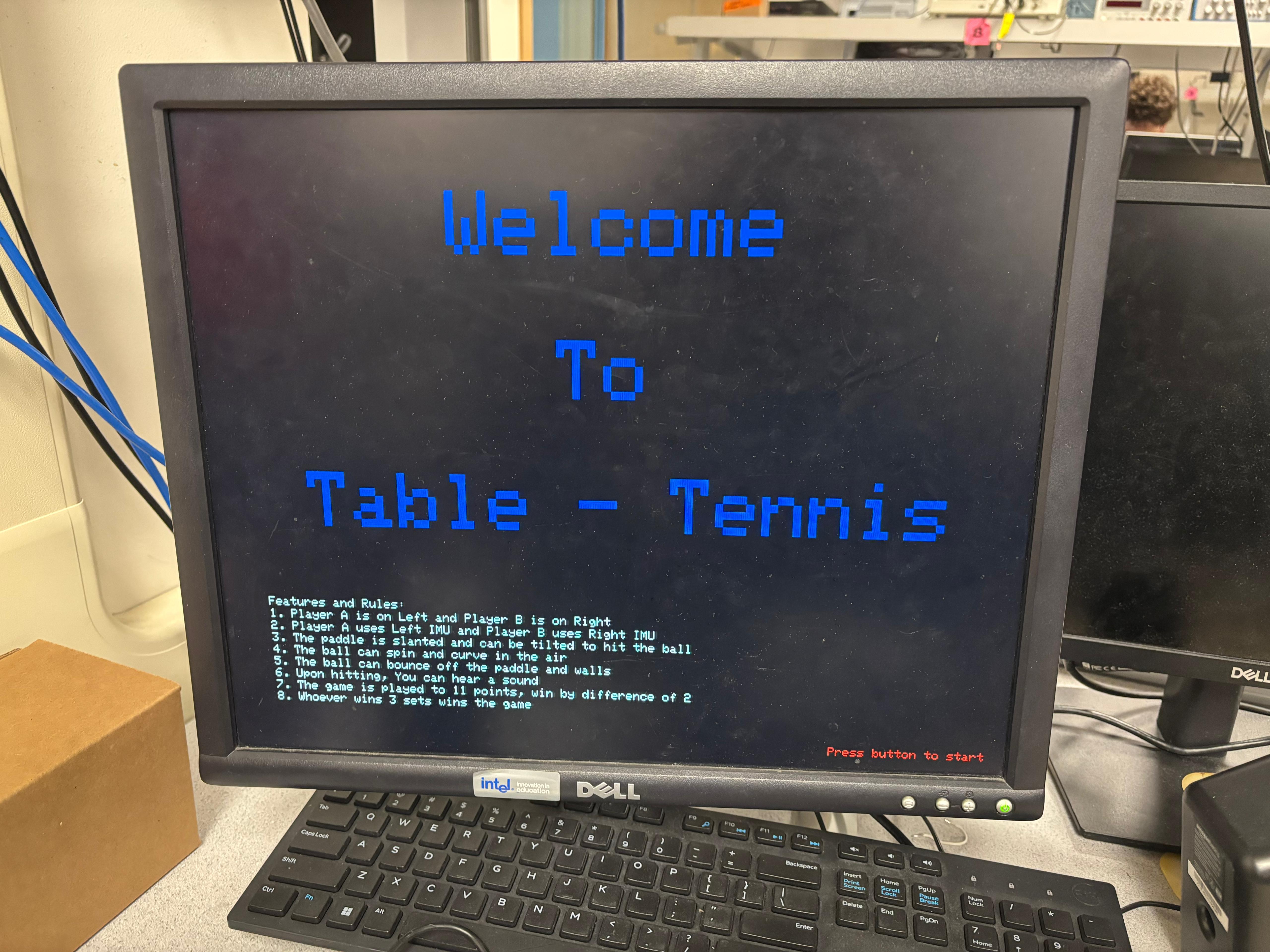
Fig [1]: Start screen with introductory text - Waits for a button press to start.
The display is cleared using fillRect, and a welcoming introduction screen is rendered via the writeString, setCursor, and setTextSize functions from the VGA graphics library. As shown in the first image, the screen prominently displays "Welcome to Table Tennis" in large blue letters centered on the screen. Below it, in small white text, are detailed game rules and features clearly instructing the players on control mechanisms, spin, audio feedback, and scoring.
Fig [2]: Button to be pressed at the start of the game
At the bottom right, in red, the phrase "Press button to start" is displayed, indicating to the user how to initiate the game. The system enters a polling loop using gpio_get to wait for this button press. On detection of a press, the screen is cleared again, the IMUs are re-initialized with init_two_mpus(), and the game logic begins.
2. Game Loop
Fig [3]: Reads IMU data, updates paddle positions, checks ball collisions,
updates display, triggers sound.
The game loop operates continuously after initialization and is managed within a Protothread running on core 0, which handles animation and gameplay. The main responsibilities of the game loop are to update ball and paddle positions, check for collisions, render graphics, manage scoring, and trigger sound feedback. Paddle positions are updated based on real-time IMU readings from core 1, which runs protothread_imus in parallel. This core separation ensures that heavy sensor polling does not interfere with time-sensitive VGA rendering. In each iteration of the loop, the ball is first erased using fillCircle in black, and its motion is calculated using wallsAndEdges(), which includes not only boundary collision detection but also Magnus force calculations from spin. After updating the ball’s position, it is redrawn, and the drawArena() function refreshes the game field, including the center line, circular field marking, and real-time scores. Paddle graphics are rendered using draw_paddles_core0(), which uses vector math to depict slanted paddles and draw_thick_line() for
Technologies used
Hardware components
- RP2040
- Raspberry Pi Pico
- VGA display
- IMU
- MPU6050
- gyroscope
- accelerometer
Software & tools
- C
- Arduino IDE
Project demo video
What you get
- Working project / hardware kit, tested before delivery
- Complete source code with explanation
- Project demo and guidance for your viva
- Project report, PPT and IEEE paper support (on request)
Related Embedded Systems projects

Gas Leakage Detector Using Arduino
A budget-friendly LPG gas leak detector built with an Arduino and MQ-5 gas sensor, triggering a buzzer and LED when unsafe gas levels are de...
View project
Simple Alarm System
A beginner-friendly home alarm with PIR motion sensing, keypad PIN entry, and separate entry/exit timing delays, built to be easy to expand.
View project
Ultrasonic Sensor Project with Arduino UNO Q
A beginner-friendly first Arduino UNO Q project: a servo-swept ultrasonic sensor that renders a live sweeping radar display in a web browser...
View project
3D Audio Localization
[Fall 2025] We designed a real-time embedded system that localizes sound sources in three dimensions and visualizes them live using a four-m...
View project