Pico WiiMote
[Fall 2025] What we did:We created PicoWiimote, a system that establishes a Bluetooth Classic connection between the Nintendo Wii Remote and a Raspberry Pi Pico W. The Pico decodes reverse-engineered Wiimote data packets and uses the resulting button, pointing, and motion data as input for a VGA-based graphical interface. A Wii-style main menu and a set of applications and games were developed to demonstrate the functionality of the controller. All controller-side
- Suitable forB.Tech/B.E Embedded Systems students
- Build time4-6 weeks
- LevelBeginner
- Available atAjvika Labs, Kakinada
About this project
Introduction
High-Level Design
Hardware
Software
Results
Conclusion
Work Distribution
Appendix
References
PicoWiimote - ECE 4760 Final Design Project
Introduction
PicoWiimote is a Bluetooth-based program that connects a Wii Remote to a Raspberry Pi Pico as a fully functional game controller.
Summary
What we did:
We created PicoWiimote, a system that establishes a Bluetooth Classic connection between the
Nintendo Wii Remote and a Raspberry Pi Pico W. The Pico decodes reverse-engineered Wiimote data packets and uses the resulting
button, pointing, and motion data as input for a VGA-based graphical interface. A Wii-style main menu and a set of
applications and games were developed to demonstrate the functionality of the controller. All controller-side
motion sensing and IR tracking data are performed on the Wiimote and placed into the packets, allowing the Pico to process data
into user inputs.
Why we did it:
The Wiimote stood out to us due to its ease of use and unique controls scheme at a low price. By connecting it to a Pico in this way, we
open the door for entirely custom applications of this technilogy. This could be used for game and app development (as we do in this project), or it could be
used in a more practical context which demand low net power consumption but require an intuitive controls input.
High-Level Design
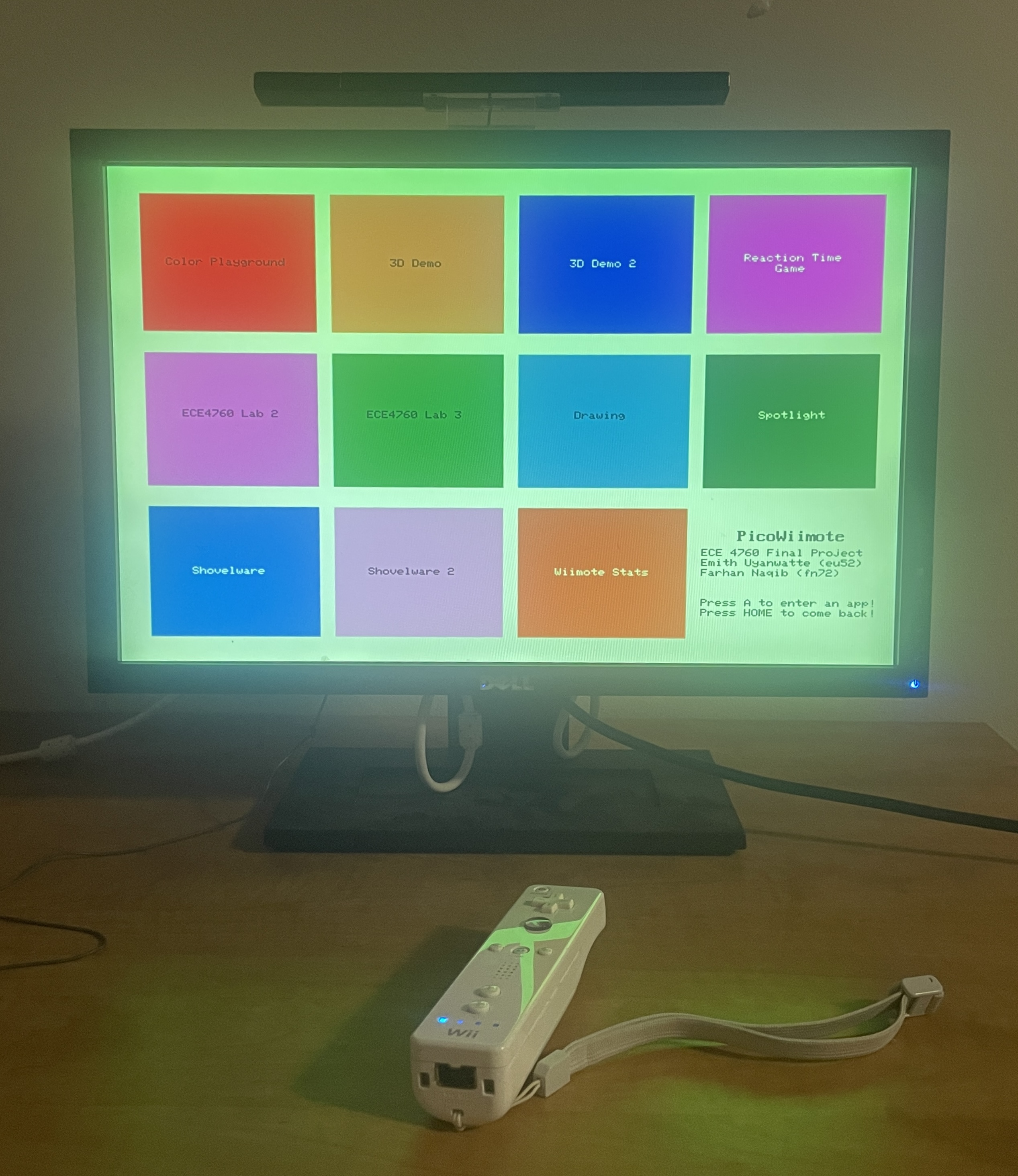
Figure: Our Main Menu
High-Level Philosophy
The Wiimote was designed to be very feature-packed, so game developers could adapt it to their games as optimally as possible.
We have the role of retrofitting it, which means that we now have access to all of these features. Given that this is a 4 week design project, this is a dangerous spot to be in.
If we were not careful, we could get stuck on perfecting one singular step of our overall goal or toying around with features for far too long, and not leaving
enough time to fully evolve the vision as was proposed.
To work around this, we adopt the mindset of this project being a technical demo. To be more specific:
Components/programs need not be bug-free or fully featured, as long as they are easily usable and capture the essence of what we are going for
Apps are designed to show off features rather than be full-on experiences in of themselves
Shortcuts and assumptions are made all throughout development to maximize development speed, as long as they don't cause glaring issues
Things may be hard-coded or not made as modular as possible if doing so makes development speed faster
Whenever we think about adding a feature, we ask ourself if it would violate this mindset. This meant that we needed to sacrifice a few interesting features, but we assume that the deadline constraint trumps all else.
Background
Bluetooth
Bluetooth is a communication protocol that enables electronics within a close range to talk to each other. It is a ubiquitous, universal protocol that has seen mass adoption and implementation. The Raspberry Pi Pico W contains a bluetooth module, making it capable of connecting to other bluetooth devices.
When used normally, the Wiimote uses Bluetooth to communicate with the Wii console. More specifically, it uses Bluetooth Classic with the HID profile. There are two main ‘types’ of Bluetooth:
Bluetooth Classic: Original Bluetooth algorithm, this works by maintaining a constant connection between devices, making it more suitable for high-bandwidth tasks at the cost of power consumption
Bluetooth Low Energy (BLE): More optimized for intermittent data transfer, this works by staying in a ‘sleep’ mode unless packets need to be sent. It is more suitable for low-bandwidth tasks, but uses far less power over a given period of time compared to Bluetooth Classic
The two Bluetooth types have different intended use cases and so are not intercompatible at either a hardware or software level. Focusing on Bluetooth Classic, there are multiple ‘profiles’ one can use which dictate the semantics of the communication itself. Nintendo chose to use the HID profile. HID defines a 'host' and 'device' as the two parties involed in a connection. Here, the Pico W is the host, and the Wiimote is the device.
Wiimote
The Nintendo Wii is a game console released by Nintendo in 2006. Nintendo heavily optimized the Wii to be as intuitive and user-friendly as possible, and this design focus aggressively changed the form factor and utility of the Wii controller (Wiimote) compared to normal game controllers. To be more specific, the Wiimote is designed to be very easy to pick up and understand, resulting in no joysticks being present on the controller. Additionally, Nintendo designed the controller such that users could ‘point’ it at their TVs and have a pointer appear at that point specifically.
In order to pull this pointer off, Nintendo devised a system in which the Wiimote can pick up on IR sources that the user is required to place above their televisions upon setting up the Wii. In doing so, the Wiimote can roughly determine where it is in relation to the IR source, which can then be used to determine where the pointer should be drawn on screen; this is elaborated on further in the software and hardware sections.
Additionally, once a Bluetooth connection is established, the Wiimote will constantly send information to the host device. The Wiimote contains its core buttons, an IR camera, and an accelerometer; by default, the Wiimote will only send the core button statuses, but can be configured to send all information when possible. The message format that the Wiimote sends looks as follows (and is elaborated upon in the software section):
(a1) 33 BB BB AA AA AA II II II II II II II II II II II II
Logical Structure
For ease of development, we chose to split this project across two cores.
Core 0:
Handles establishing and maintaining the Bluetooth connection to the Wiimote
Core 1:
Handles all else (game logic, VGA display maintainence)
In theory, this project could have been done on one core due to the interrupt-based nature of the Bluetooth packets. We chose to split this
into 2 cores anyways simply because we have the resources available and doing so prevents the possibility of timing issues contaminating
the Bluetooth connection.
Legal Concerns
The Wiimote is a Nintendo game controller, first and foremost. They own the patent to the device and any reverse engineering was performed by a third party without their explicit permission.
With that said, legal precedents with respect to video game hardware fall primarily towards unlocking the ability to run pirated media; discussion on the modification and reverse-engineering of such systems for reasons other than piracy fall into legal gray areas, with cases on the topic being dismissed as recently as 2025. We are clearly not committing software piracy, on a device that Nintendo has not manufactured for the better part of a decade, using information that is as equally accessible to us as it is to Nintendo; our use-case falls into a gray area as-is, and so with the additional context of the hardware being decades old, makes the legality of this project not a major concern.
Hardware Design
The hardware component of this project is not particularly intensive in the sense that we didn’t need to invent anything, but there is still enough of note that a discussion of some component is warranted, mainly because an understanding of the hardware helps to motivate many of our software decisions.
Wii Controller (Wiimote)
Figure: Wii Controller
The controller we use for this project is a generic, used Wiimote that we bought off of Amazon. The Wiimote is, for all intents and purposes, a fully-running embedded system. It uses a Broadcom BCM2042 SOC, which provides core embedded functionality (a processor, RAM/ROM, etc.), expandability to peripherals, and a Bluetooth processor.
The BCM2042 is an off-the-shelf chip, pre-configured for the Bluetooth HID profile. Nintendo’s decision to use this SoC is one of the biggest reasons this project was possible, as it meant that issues surrounding proprietary software/hardware and reverse-engineering their would could be kept to a minimum. Furthermore, generic Bluetooth HID code for the Pico is plentiful, providing an easier platform to start software development upon.
Nintendo included a number of features on the Wiimote, which the BCM2042 treats as external peripherals. For this project, the ones of note are the buttons, accelerometer, and IR camera. There are a series of buttons across the Wiimote, and the Wiimote itself performs debouncing as button inputs are received. Nintendo included an ADXL330 accelerometer module on the Wiimote, which offers 3-axis acceleration data of the Wiimote. In our testing, the accelerometer was found to be pretty imprecise, and best utilized when ignoring directions and only using magnitude values (such as to pick up on actions such as swinging). Finally, Nintendo includes a 128*96 IR camera on the front of the unit. Discussion of this camera is covered in the software design section.
Figure: Wiimote IR Camera Exposed
Wii Sensor Bar
Figure: Wii Sensor Bar
Every Wii came with a sensor bar, which customers were instructed to place at the top of their TVs. This ‘sensor bar’ is actually just a constant IR light source which the Wiimote’s IR camera can then pick up on; it plugs into the Wii purely for power. We purchased a very similar product which has a USB port for power (and not the proprietary connector Nintendo put on official Wii sensor bars) simply to maintain the theme of retrofitting Nintendo’s products. Technically though, any singular IR source placed atop the display would work as the Wiimote looks for and works with any arbitrary source of IR light in its environment.
VGA Printed Circuit Board
Figure: VGA Printed Circuit Board
For this project, a custom VGA PCB (designed by Prof. Hu
Technologies used
Hardware components
- Raspberry Pi Pico
- VGA display
- IMU
- accelerometer
- ADC
- Bluetooth module
Software & tools
- C
- Arduino IDE
Project demo video
What you get
- Working project / hardware kit, tested before delivery
- Complete source code with explanation
- Project demo and guidance for your viva
- Project report, PPT and IEEE paper support (on request)
Related Embedded Systems projects

Gas Leakage Detector Using Arduino
A budget-friendly LPG gas leak detector built with an Arduino and MQ-5 gas sensor, triggering a buzzer and LED when unsafe gas levels are de...
View project
Simple Alarm System
A beginner-friendly home alarm with PIR motion sensing, keypad PIN entry, and separate entry/exit timing delays, built to be easy to expand.
View project
Ultrasonic Sensor Project with Arduino UNO Q
A beginner-friendly first Arduino UNO Q project: a servo-swept ultrasonic sensor that renders a live sweeping radar display in a web browser...
View project
3D Audio Localization
[Fall 2025] We designed a real-time embedded system that localizes sound sources in three dimensions and visualizes them live using a four-m...
View project