Box stacker game
[Fall 2025] We built a game called “Block Stacker” in which the user tilts a controller to stack blocks on a digital platform in a 2D simulated physics environment, complete with interactive controls, goofy graphics, and exciting background music.
- Suitable forB.Tech/B.E Embedded Systems students
- Build time4-6 weeks
- LevelBeginner
- Available atAjvika Labs, Kakinada
About this project
August Druzgal, Coraline Chu
Project Introduction
We built a game called “Block Stacker” in which the user tilts a controller to stack blocks on a digital platform in a 2D simulated physics environment, complete with interactive controls, goofy graphics, and exciting background music.
What we built and why
The gaming interface mainly consists of colored boxes spawned from the top of the screen, falling under gravity calculations, and landing on a rotating platform. Once the block lands, it will snap into an invisible grid structure similar to the tetris game and slide along the board. The user’s goal is to control the tilt of the board through input of the controller to let as few blocks fall from the edge of the board as possible. The project as such is implemented as an interactive gaming loop that uses only resources on the RP2040: from physics simulation for the box and the platform rotation and VGA rendering to user input from the wirelessly connected controller, which changes the physics simulation.
We created this game as it combines the topics of VGA graphics, real-time control, and physics modeling in class into one design in the final project. The implementation of the game is organized as several elements: (1) a 2D grid to be occupied, (2) a pool of falling boxes, and (3) a platform state that depends on its own parameters as well as the boxes mounting situation. As a result of more boxes falling and landing on the board, the game will present increased difficulty as the balancing becomes more tricky. In addition, we added a bluetooth feature for wireless control for the user input, as well as background music for user experience. For more user friendliness, the user is greeted with an opening page that is decorative but also shows whether the necessary controller is connected. The closing page similarly shows how well the user did, summing the amount of time that the user was able to play without losing. The core physics of the game is intentionally simple but robust, with the combination of gravity, grid-based stacking, and grid sliding to create a dynamically interesting interface while keeping the resources used feasible in an RP2040.
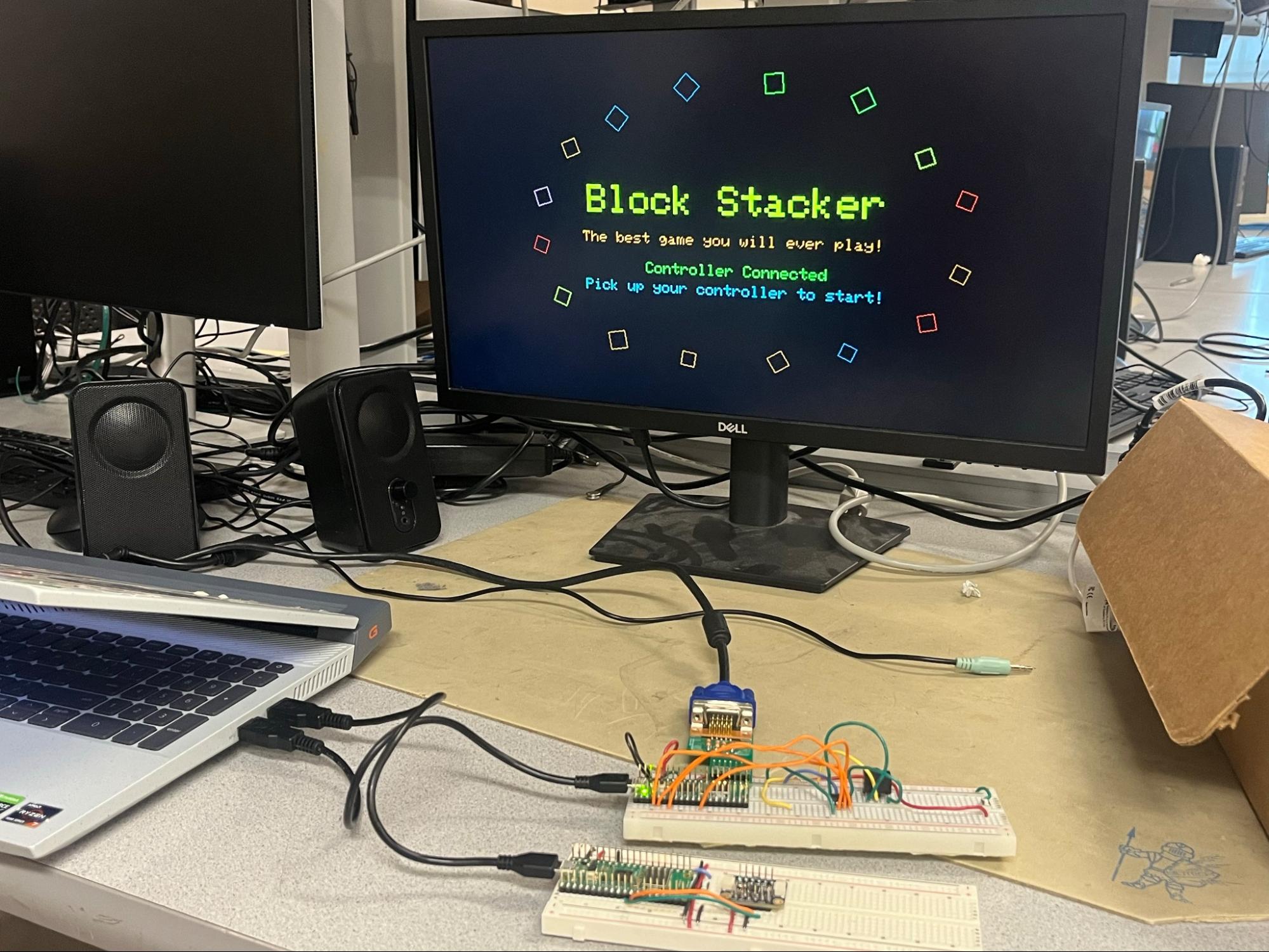
Below is a picture of the gaming setup.
High level design
Rationale and sources of project idea
We hoped to create a project that combines the topics introduced and practiced in the class, namely VGA graphics, real-time control, background sound, and physics modeling. A gaming interface would naturally encompass all of these topics, but present each of the subjects in a different manner. In this way, we can create a project of an embedded-system style. In this context, we chose a classic game topic to build our game toward - stacking boxes. The main inspiration of creating a box-stacking game is to be able to render an display that seem physically believable or “real” in the managing boxes weight and balancing efforts, but also being able to use only the resources on an RP2040 to robustly implement the functionalities. One special difference between the physics presented here and the physics in the second lab project is the interaction between the objects moving under physics (boxes here), which is an added layer of challenge for us. Therefore, we designed the physics restrictions to be intentionally simplified but robust to achieve balance with realness and feasibility.
Background math
A key design choice to simplify the physics is to represent the motion of boxes in two coordinate systems:
World frame coordinates. The is the normal screen coordinates, where falling boxes will use as the position and velocity is updated by the physics;
Board/local coordinates. Once the boxes land on the board as a part of the discrete grid cells, the position and velocity is calculated as on board coordinates where u is along the board and v is normal to the board. As the grid is considered as an integral body, the boxes in the grid will have the same position and velocity with respect to the board local coordinates.
Thus, the boxes that land will follow the local coordinate and behave as a whole, which significantly reduces the calculation requirements compared to what is required to compute realistic box interactions of colliding, falling, and rotating. The coordinate transformation from world coordinates
to board coordinates
is as follows. (The real equations used in the code have been submitted to AI to generate latex format for the purposes of explanation)
Let dx and dy be defined as the following:
Where
and
are central location coordinates of the board’s central axis, and the angle
is the current rotation angle of the board. Then
is defined as:
The interpretation is that
measures the distance of the box along the board, while
measures the distance from the board upward (vertically, related to how high the box is stacked).
Similarly, the transformation can be carried backwards from the local coordinates to as world coordinates as the following:
The sliding dynamics on the board is attributed from gravity and some offset as friction. Gravity along the board is simply calculated as:
And the friction is simply carried by a multiplication of a fraction. Combining the tangential gravity and the friction, these two element drives a 1D sliding with velocity of
. The entire grid will be offset at the same speed; the column that offsets outside the range of the board will be removed from the animation.
The board is modeled as a damped spring with added torque inputs from the boxes that are stacked on the top. Each individual box occupying a cell in the grid will contribute a torque attribute that is proportional to its lever arm distance along
. The mathematical representation of the board system is as such:
Where w is the board angular velocity,
is the board rotational inertia, tau is the total torque on the board produced by all the landed boxes,
is the rotational spring constant, and
is the rotational damping coefficient.
Lastly, the boxes’s corner in rotation (of angle
) are computed using traditional trigonometry for drawing in VGA, exampled as:
Logical structure
The gaming system is divided into the following subsystems while organizing around the physics:
The game state machine: presenting the title screen, the main gaming screen, and the ending/losing screen.
Physics animation engine: board physics animation, spawning boxes falling, landing condition computation, grid sliding/offset update
VGA rending: erasing objects from the previous frame and updating the new objects.
Controller bluetooth interface: receiving the update of the user-input tilt angle and input into the gaming.
Audio: adding a background music between the menu screen and the gameplaying screen.
The game is organized with protothreads, running protothreads on both cores to maximize the computational power available to the system. Core 0 runs the bluetooth client functions, and core 1 runs the VGA protothread, alongside the music protothread.
Hardware/software tradeoffs
The major resource constraint is the computation power of the RP2040 in the physics calculation. As we discussed above, in order to allow feasible resource use on the RP2040 to successfully implement this game, we used the grid-based physics animation in place of the rigid body simulation for boxes. The drawback is that the visual will inherently look less physically realistic, especially during contact. Below is a comparison of strategies.
LEFT: Traditional rigid body collision (
gamedev.net
) vs RIGHT Box stacker, grid based
Copyrights and trademarks
There is no known copyright and trademark related or used in our project. Libraries and codes used for user input control and VGA rendering are all common and available in the public domains or course websites. The implementation of the physics is original software written by the group members, based on common physics formulas.
Program/hardware design
Organization of objects/elements
The program is organized around a set of structs (boxes, board) and global constants (physics parameters, current grid positions and velocities) that define the main objects in the game, and will update in real time.
Key structs include:
phys_platform_t: the rotating board definition, with attributes of the board center, angle, angular velocity.
falling_box_t: the boxes definition, with attributes of the world frame coordinate, vertical velocity, activity status, and color.
grid_location: the location in the grid, with the attributes of occupancy (yes or no) and color for the cell.
display_block: define the decorative boxes in the title/end screens, with attributes of position, drift amplitudes, drift rate, spin rate, size, color.
The boxes that fit the condition of landing will be stored in grid[GRID_COLS][GRID_ROWS], specifically with 15 columns and 12 rows. Each cell has the predefined width and and height of 20 pixels. When the board rotates (angle updated), the grid with all the boxes within will render with the same angle. The grid will slide with a velocity of grid_v and an offset of grid_offset_u using the math calculations presented previously. These calculations do not affect the falling boxes.
Game state transitions
The game state is determined by the game machine to switch between the beginning screen, main gameplay screen, and the ending screen. An image of each of the rendered screens is shown below.
Title page
Game page
Ending page
To progress through the game, the VGA display cycles through these steps:
Initialize the beginning/title screen; greeting phrase is selected.
Wait for the controller to be connected and an initialization prompted by the user by picking up the controller.
Start the countdown for the game to start.
Initialize the physics animation and update each frame.
Upon game-over condition is reached (defined by depletion of health points), the final time is recorded, and the VGA switches to an “end screen” with a fixed amount of wait time until the new game beg
Technologies used
Hardware components
- RP2040
- VGA display
- IMU
- compass
Software & tools
- C
- Arduino IDE
Project demo video
What you get
- Working project / hardware kit, tested before delivery
- Complete source code with explanation
- Project demo and guidance for your viva
- Project report, PPT and IEEE paper support (on request)
Related Embedded Systems projects

Gas Leakage Detector Using Arduino
A budget-friendly LPG gas leak detector built with an Arduino and MQ-5 gas sensor, triggering a buzzer and LED when unsafe gas levels are de...
View project
Simple Alarm System
A beginner-friendly home alarm with PIR motion sensing, keypad PIN entry, and separate entry/exit timing delays, built to be easy to expand.
View project
Ultrasonic Sensor Project with Arduino UNO Q
A beginner-friendly first Arduino UNO Q project: a servo-swept ultrasonic sensor that renders a live sweeping radar display in a web browser...
View project
3D Audio Localization
[Fall 2025] We designed a real-time embedded system that localizes sound sources in three dimensions and visualizes them live using a four-m...
View project