Asteroid defense game
[Spring 2025] For our final project, we implemented an 80s-inspired space-themed arcade game. We based our design off of the classic game asteroids, wherein the player controls a rocket ship as it navigates and destroys asteroids with a laser. However, we introduce a unique twist - the player must defend a planet (placed in the center of the screen), and navigate around it subject to orbital physics. The player controls the rocket ship using a joystick with 8 different combinations of directions
- Suitable forB.Tech/B.E Embedded Systems students
- Build time4-6 weeks
- LevelBeginner
- Available atAjvika Labs, Kakinada
About this project
A 2D gravity-based asteroid defense game.
Intro
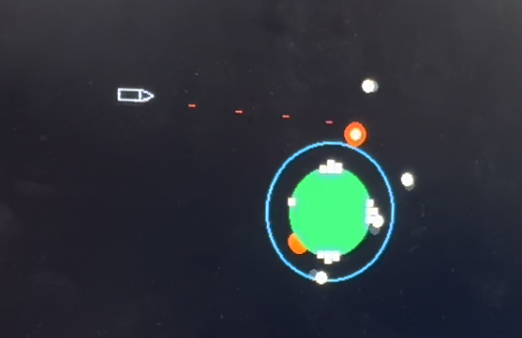
For our final project, we implemented an 80s-inspired space-themed arcade game. We based our design off of the classic game asteroids, wherein the player controls a rocket ship as it navigates and destroys asteroids with a laser. However, we introduce a unique twist - the player must defend a planet (placed in the center of the screen), and navigate around it subject to orbital physics. The player controls the rocket ship using a joystick with 8 different combinations of directions and a miniature peddle for thrust, while continuously shooting lasers. Asteroids spawn randomly in clumps at different corners of the screen and spread out after orbiting the planet. The planet is home to 4 cities at the east, west, north, and south faces, each with three lives. Upon collision with an asteroid, a building from the nearest city will be destroyed. Once all cities are gone, or the player's ship has collided with an object three times, the game is over. Each laser makes a high frequency sound, and the thrust and explosion sounds utilize white noise.
Figure 1.
Asteroids!
High Level Design
Gameplay
Our main goal for this game was to create a gameplay loop that incorporated the somewhat unintuitive nature of
orbital mechanics. We wanted to force the player to develop a basic understanding of these mechanics to be able to
effectively navigate the play-space, and successfully shoot down asteroids. The main way we did this was by limiting the navigation and offensive options of the player.
The player controls an orbiting rocket ship which can rotate freely in space, but can only accelerate in the direction it is pointing.
This forces the player to learn to understand how the direction of thrust in a rocket affects its orbit. In a game without gravity,
the navigation would be as simple as pointing the rocket towards the location the player wished to go to, and hitting the accererator.
Howver, in orbit, this is not so simple. Acceleration always affects the shape of the player's orbit. For example, acceleration in the
direction of the rocket's current velocity will raise the height of the orbit on the oposite side of the planet. Conversely, accelerating
against the direction of the rocketship's current velocity will lower the height of the orbit on the oposite side of the planet, potentially enough
that the orbital path intersects with the planet, causing the rocket to crash unless other action is taken. We chose to have the edges of the screen
loop around to each other rather than making them hard barriers to make sure the rocket is always being affected by gravity. Raising the orbit enough that the rocket hits the edge of the screen
will mean that the rocket loops around to the opposite edge of the screen. This was found to be a much smoother experience than just bouncing the ship off the edge of the screen, which felt jarring during gameplay testing
The rocket can only shoot lasers in the direction it is facing. This causes an inherent tradeoff with the thrust of the rocket, as
it can also only be applied in the direction of the rocket. Say, for example, the player wants to shoot at a group of asteroids on the far side
of the screen. These asteroids are out of range of the rocket's lasers, and so the player must make a navigation choice in order to place
the rocket in a position it can shoot the asteroids. Thrusting towards the asteroids could cause the rocket to raise it's orbit height on the far side
of the planet so much that the rocket would be even farther from the asteroids after the pass, giving them more time to spiral inwards if the player cannot
manage to shoot all of them. If the dynamics of the situation are slightly different, accelerating towards the asteroids could cause the rocket to lose all of
its velocity relative to the planet, risking the rocket falling into the planet and crashing unless the player can add enough speed back after shooting the asteroids to regain
a stable orbit.
Making these types of descisions and overcoming challenges is what makes the core of the game fun to play, and so it was important to us to tune the parameters of the game to
make sure the player encounters these choices regularly. This is why the asteroids come in waves from different corners of the screen, and why their
positions and velocities are slightly randomized. The asteroids slowly spread out as they spiral inwards towards the planet, forcing the player to navigate
the space if they want to shoot all of them down.
Gravity Simulation Background Math
The whole game runs on top of a simple 2D gravity simulation that uses Newton's law of gravity to update the positions
of the ship and asteroids every frame. The following psudeocode represents the simplest possible version of this algorithm
which simulates just one pointlike ship orbiting a pointlike planet:
//loop repeats every frame
while
(
){
//calculate angle between center of ship and center of ship
angle
=
atan2(the_ship.y
the_planet.y, the_ship.x
the_planet.x);
// calculate the squared distance between ship and planet
//(because gravity follows inverse square, we do not need a square root)
distance_sq
=
abs(the_planet.x
the_ship.x)
*
abs(the_planet.x
the_ship.x)
+
abs(the_planet.y
the_ship.y)
*
abs(the_planet.y
the_ship.y);
//calculate the total force of gravity on the ship
force
=
-1*
GRAV_CONST
*
(the_planet.mass
*
the_ship.mass)
/
distance_sq;
// convert total force to total acceleration
accel
=
force
/
the_ship.mass;
//separate the total acceleration into it's x and y components
accel_x
=
accel
*
cos(angle)
+
thrust_x;
accel_y
=
accel
*
sin(angle)
+
thrust_y;
//use euler integration to update ship's velocity and position
the_ship.vx
=
the_ship.vx
+
accel_x;
the_ship.vy
=
the_ship.vy
+
accel_y;
the_ship.x
=
the_ship.x
+
the_ship.vx;
the_ship.y
=
the_ship.y
+
the_ship.vy;
}
This algorithm is also run for every asteroid on screen.
Logical Structure
Figure 2.
Flow Chart of Logical Structure
Program Design
The game runs at 30 frames per second, and the physics and gameplay are all updated on a frame by frame basis.
Each frame the program does a multitude of condition checks and updates to a set of stucts that represent each of the game objects, then updates the VGA screen.
Figure 3.
Example Shot of Game in progress
Structures
The Planet
typedef
struct
{
float
x;
float
y;
float
radius;
float
mass;
float
atmosphere;
} Planet;
The planet is placed in the center of the screen, and
is the object that all other objects orbit around. It has the largest mass of the system, and
it's position is not updated based off of the potential gravity of any other objects in order to
keep the game stable, and prevent the planet from drifting off screen. The planet is represented on screen
by a filled in dark green circle with a pixel radius equal to the radius variable. We found that the large
radius of the planet meant that there could be noticable flickering if it was redrawn every frame, and so the planet is
only redrawn when an event occurs that could draw over it, such as the ship or an asteroid colliding with it.
The
atmosphere
variable of the planet is the distance in pixels away from the radius of the planet that the edge of the atmosphere
is drawn, represented by a cyan circle. It is drawn every frame. The purpose of the atmosphere is to slow down
the asteroids that pass through it so that they will spiral in towards the planet and collide. This is done by checking
if the distance of the asteroids from the center of the planet is less than the radius plus the atmosphere variable. If it is,
the asteroids experience "drag", which is approximated by multiplying the velocity of the asteroid by 0.994 plus a random number
between 0 and 0.001 every frame. The random variable is there to help spread the asteroids out as they spiral in towards the planet,
which adds another layer of challenge to the game.
The Ship
typedef
struct
{
float
x;
float
y;
float
vx;
float
vy;
float
radius;
float
mass;
int
direction;
int
lives;
} Ship;
The ship is the most complex object in the game. Every frame, the ship needs to be set to a new direction based off of the
user's inputs, have it's acceleration updated by the gravity of the planet, have its acceleration updated if the user is instructing the ship to thrust,
update its position and velocity based off of the calculated accelration this frame, check if it has collided with an asteroid or the planet, and be erased
and redrawn.
The ship can face in eight possible directions; Up, Down, Left, Right, Up-Left, Up-Right, Down-Left, and Down-Right.
These correspond to the eight states the digital joystick can provide. Every frame, the joystick inputs are read by the program,
which sets the direction variable of the ship to the value that corresponds with the direction the user is pointing the joystick.
This direction variable is then used for three things; how the ship is redrawn, the direction of the acceleration vector of the ship if
the ship is under thrust, and what direction to shoot the lasers.
Every frame, a new acceleration vector is created by calculating the acceleration due to the gravity of the planet.
The acceleration vector due to the rocket engine is added to this vector if the user has the thrust button held down that frame.
The program then modifies the ship's velocity and position vectors through euler integration.
The "radius" of this ship is approximately it's length, and is used to approximate collison detection without having to
Technologies used
Hardware components
- IMU
Software & tools
- C
- Arduino IDE
Project demo video
What you get
- Working project / hardware kit, tested before delivery
- Complete source code with explanation
- Project demo and guidance for your viva
- Project report, PPT and IEEE paper support (on request)
Related Embedded Systems projects
Gas Leakage Detector Using Arduino
A budget-friendly LPG gas leak detector built with an Arduino and MQ-5 gas sensor, triggering a buzzer and LED when unsafe gas levels are de...
View project
Simple Alarm System
A beginner-friendly home alarm with PIR motion sensing, keypad PIN entry, and separate entry/exit timing delays, built to be easy to expand.
View project
Ultrasonic Sensor Project with Arduino UNO Q
A beginner-friendly first Arduino UNO Q project: a servo-swept ultrasonic sensor that renders a live sweeping radar display in a web browser...
View project
3D Audio Localization
[Fall 2025] We designed a real-time embedded system that localizes sound sources in three dimensions and visualizes them live using a four-m...
View project