Airdrums
[Fall 2025] Traditional drum kits are expensive, bulky, difficult to transport, and often impractical for on-the-go practice for the average busy person. However, air drumsticks offer a portable and accessible alternative for both practice and entertainment, allowing users to make drumming gestures in the air to trigger sound effects that emulate the percussion instruments of a real drum kit.
- Suitable forB.Tech/B.E Embedded Systems students
- Build time4-6 weeks
- LevelBeginner
- Available atAjvika Labs, Kakinada
About this project
High Level Design
Program / Hardware Design
Results
Conclusions
IP Considerations
Appendices
Airdrum Kit
ECE 4760 Final Project
Liam Lahar · Christina Huang · Alex Baker
Airdrum Kit
Team Members:
Course:
ECE 4760 – Designing with Microcontrollers
Introduction
Traditional drum kits are expensive, bulky, difficult to transport, and often impractical for on-the-go
practice for the average busy person. However, air drumsticks offer a portable and accessible alternative for both
practice and entertainment, allowing users to make drumming gestures in the air to trigger sound effects that emulate
the percussion instruments of a real drum kit.
Project Summary
For the final project, we developed and designed a set of air drumsticks that provide a motion-based auditory interface,
allowing users to trigger and control sounds by mimicking the action of striking a physical drum.
To accomplish this, we designed a set of 3D-printed drumsticks with half-shell enclosures and integrated each
with a 9-DOF IMU (BNO085), enabling complete angular orientation awareness. The drumsticks are able to play
different sounds depending on the radial location (yaw) at which the virtual “drum” is struck. A drum strike is
determined using an angular threshold (pitch), while the volume of the sound produced depends on the velocity
at which the “drum” is hit.
Additionally, we implemented unique air drum modes by utilizing a twisting gesture (roll) to switch between four
preprogrammed sound modes: Drum Kit, Piano, Special Effects, and Drum Solo. We also added a recalibration feature
that allows the user to zero the position of all three angular axes of each drumstick, enabling a comfortable and
customizable drum orientation and playing angle.
Finally, we integrated all hardware external to the drumsticks into a small, portable enclosure that houses the
electronic components and connects to each drumstick via a pair of thin wires. This enclosure contains each stick’s
Raspberry Pi Pico, mini MP3 DFPlayer, speaker, and recalibration button, all of which are cleanly incorporated onto
a single protoboard, resulting in a compact and self-contained system design.
Our air drumsticks generate sound electronically based on striking motions and gestures, providing a cheaper, more
portable, versatile, and entertaining alternative to purchasing a physical drum set. While our implementation is
by no means a market-ready product, it provides a strong proof of concept that demonstrates the feasibility and
flexibility of motion-based musical interfaces built using embedded systems.
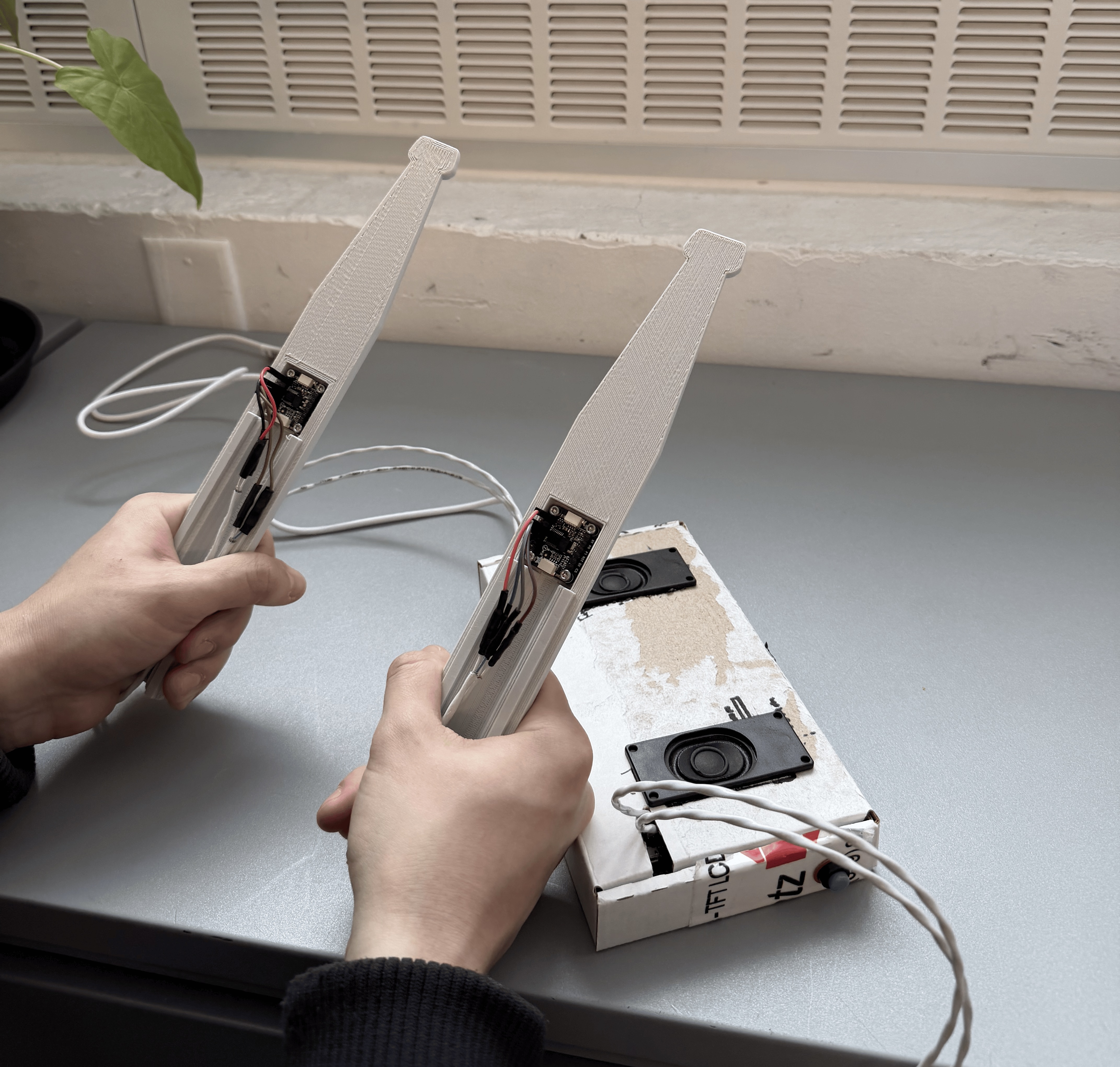
Figure 1: Handheld Airdrum controllers and speaker module.
High Level Design
Rationale and Sources
When deciding on a final project, we prioritized iterability, the ability to add features, our interests, and cost.
Our group was heavily influenced by the third lab project for ECE 4760, PID control of a 1D helicopter, as it strongly
exemplified how embedded circuitry can work in unison with mechanical systems. We found that the best avenue to achieve
these goals was to create drumsticks that play sounds when the user mimics the motion of hitting a drum. This project
is both interesting to demonstrate and to develop, as the technical challenge of playing a sound from a simple arm
movement at a specific location requires precise arithmetic and careful attention to accuracy.
In particular, we were attracted to the iterative nature of the project. At its core, a simple implementation using
a basic 6-DoF IMU and a button to switch drum sounds already presents interesting design challenges, such as determining
when a hit occurs and triggering the correct sound file. However, our implementation was able to expand significantly
beyond this baseline. We implemented more flexible methods of sound production using a DFPlayer communicating over
UART, and by using a 9-DoF IMU, we were able to obtain complete angular orientation. Collectively, these features gave
us substantial creative freedom in designing our drumsticks.
The 9-DoF IMU enabled a more sophisticated approach to selecting drum sounds based on angular position relative to the
body, resulting in a more realistic experience similar to a physical drum kit. Additionally, the use of DFPlayers
provided virtually limitless potential for sound selection, quality, and storage. As a result, our drumsticks are
capable of playing a full drum kit, a piano, triggering sound effects, performing complex drum solos, or supporting
many other sound modes. By incorporating IMU-based sensing, we were also able to develop hand gestures as an intuitive
and interactive method for switching between these preprogrammed modes.
Lastly, while we are very happy with our current air drumstick implementation, the project remains extremely versatile.
Additional features such as wireless communication, motor vibration feedback on drum hits, expanded user options for
drum modes, or integration with a VGA display to interact with a drumming or other video game are all possible
extensions of our baseline architecture.
Background Math
The IMU used for this project is a
BNO085
. This IMU contains a
3-axis accelerometer, 3-axis gyroscope, 3-axis magnetometer, an on-chip
microcontroller, and sensor-fusion firmware. Because the IMU contains an embedded
microcontroller, it is able to process, calculate, and filter sensor data internally
before sending orientation information to the RP2040.
The BNO085 IMU internally estimates 3D orientation using a unit quaternion
representation, which is maintained and updated through Bosch’s closed-source
sensor-fusion firmware. Although the exact fusion algorithm is proprietary, the device
outputs a normalized quaternion whose magnitude is constrained to one for numerical
stability.
The quaternion is defined as
$$ Q = (w, x, y, z) $$
where
$$ w = \cos\left(\frac{\theta}{2}\right) $$
and
$$ (x, y, z) = \sin\left(\frac{\theta}{2}\right)\,\hat{\mathbf{u}} $$
with $\hat{\mathbf{u}}$ representing the unit rotation axis. This representation avoids
drift issues associated with Euler angle integration.
Yaw, pitch, and roll are computed from this quaternion using standard
quaternion-to-Euler angle transformations:
$$
\text{roll} = \operatorname{atan2}\!\left(2(wz + xy),\, 1 - 2(y^2 + z^2)\right)
$$
$$
\text{pitch} = \arcsin\!\left(2(wy - zx)\right)
$$
$$
\text{yaw} = \operatorname{atan2}\!\left(2(wx + yz),\, 1 - 2(x^2 + y^2)\right)
$$
These equations are standard in orientation estimation and can be found implemented in
libraries such as Adafruit’s BNO08x Arduino library, which was used in this project.
The function call
atan2
is a special inverse tangent function that examines
the signs of its two inputs and maps the result into the correct quadrant, producing an
output between $-\pi$ and $+\pi$, which corresponds to the valid range for roll and yaw.
The first parameter of the function,
$2(wx + yz)$, is essentially $\sin(\text{roll})$ or $\sin(\text{yaw})$, while the second
parameter, $1 - 2(x^2 + y^2)$, represents $\cos(\text{roll})$ or $\cos(\text{yaw})$.
By using both sine- and cosine-like terms, the IMU is able to preserve orientation and
compute angles continuously across $360^\circ$, resulting in accurate directional
estimates. Pitch does not use
atan2
since its range is limited to
$-\pi/2$ to $+\pi/2$.
In addition to orientation estimation, the BNO085 performs gravity vector estimation,
gyroscope bias correction, and sensor fusion across accelerometer, gyroscope, and
magnetometer data to improve stability and long-term accuracy.
Figure 2: BNO085 IMU Reference: Adafruit
Logical Structure
Our drumstick structure consists of a dual-microcontroller architecture, where each
of two RP2040 microcontrollers independently handles the functionality of a single
drumstick. Each RP2040 communicates with a BNO085 IMU over I2C to acquire orientation
data in the form of yaw, pitch, and roll, which are then used for further calculations.
Each RP2040 also communicates with an external DFPlayer module over UART to trigger
sound playback. These serial commands instruct the DFPlayer to decode the selected
audio file, convert it to an analog signal, and amplify it for output through a
speaker.
Within the software, multiple protothreads are instantiated to handle the different
computation and control tasks. To calibrate the origin of the drumstick, each unit
includes a dedicated push button that resets the yaw, pitch, and roll reference to the
current orientation of the drumstick at the moment the button is pressed. Another
protothread continuously gathers yaw, pitch, and roll data from the IMU; these values
are then normalized relative to the user’s position and used to calculate the velocity
of the drumstick.
Modular arithmetic is used to define the threshold required for a drum sound to play
and to determine which sound is triggered based on the angular location of the
drumstick. To prevent discontinuities in yaw, pitch, or roll, angular wrapping is
employed to eliminate sudden jumps in the calculated orientation when crossing
positive or negative angle boundaries. This is achieved by adding or subtracting
$2\pi$ to map negative angles to their equivalent positive values.
Because the IMU’s coordinate system is defined relative to the Earth’s frame, it was
necessary to allow the yaw and pitch origins to align with the user’s orientation.
Since all calculations are based on the IMU starting at the origin, recalibrating the
origin enables the user to face any direction while maintaining consistent control. By
recording the initial yaw and pitch values, subsequent measurements are computed
relative to the user by subtracting the
Technologies used
Hardware components
- RP2040
- Raspberry Pi Pico
- VGA display
- IMU
- gyroscope
- accelerometer
- speaker
Software & tools
- C
- Arduino IDE
Project demo video
What you get
- Working project / hardware kit, tested before delivery
- Complete source code with explanation
- Project demo and guidance for your viva
- Project report, PPT and IEEE paper support (on request)
Related Embedded Systems projects

Gas Leakage Detector Using Arduino
A budget-friendly LPG gas leak detector built with an Arduino and MQ-5 gas sensor, triggering a buzzer and LED when unsafe gas levels are de...
View project
Simple Alarm System
A beginner-friendly home alarm with PIR motion sensing, keypad PIN entry, and separate entry/exit timing delays, built to be easy to expand.
View project
Ultrasonic Sensor Project with Arduino UNO Q
A beginner-friendly first Arduino UNO Q project: a servo-swept ultrasonic sensor that renders a live sweeping radar display in a web browser...
View project
3D Audio Localization
[Fall 2025] We designed a real-time embedded system that localizes sound sources in three dimensions and visualizes them live using a four-m...
View project