Build an ESP32 Text-to-Speech Using Wit.ai
Complete ESP32 text to speech using AI guide. Learn ESP32 TTS library setup, circuit wiring, code examples for voice-enabled IoT projects with MAX98357A amplifier.
- Suitable forB.Tech IoT students
- Build time3-4 weeks
- LevelIntermediate
- Available atAjvika Labs, Kakinada
About this project
Text-to-Speech, or TTS, is a technology that converts written text into spoken audio. It is widely used in voice assistants, accessibility tools, alert systems, kiosks, and smart devices. Today, ESP32 Text to Speech using AI has become a common approach for adding voice output to small electronic projects. On computers and smartphones, TTS works smoothly because these devices have enough processing power and memory to handle speech generation internally. Microcontrollers are different. They have limited speed, limited memory, and no native support for complex audio processing, which makes text-to-speech in ESP32 difficult to perform locally. Explore our additional example and resources on our ESP32 Projects hub.
The ESP32 is more capable than many other microcontrollers, but generating natural speech directly on the device is still not practical for real-world use. Because of this, cloud-based solutions are often used. The ESP32 sends text to an ESP32 Text to Speech online AI-based service, which converts the text into speech and sends the audio back. The ESP32 then plays the received sound through a speaker. This method allows text-to-speech conversion using ESP32 to work reliably, giving small devices a clear voice output without overloading the hardware or increasing system complexity. A similar concept has also been explored in an earlier project using Arduino based offline TTS approach with the Talkie library. The complete guide demonstrates the process of implementing ESP32 text to speech online using Wit.ai cloud AI service. The document explains all aspects of IoT voice output implementation through hardware setup demonstration, ESP32 TTS library usage, circuit connection details and complete code implementation. The AI Projects and Tutorials curates a variety of real-world AI and machine learning project guides like ESP32 voice systems, smart parking, and robot builds to help makers and engineers apply practical AI concepts.
What is ESP32 Text to Speech and Why Use AI-Based Solutions?
Why ESP32 Needs Cloud-Based TTS
Required Hardware Components
Circuit Diagram and Wiring
Pin Connection Table
Setting Up Your Wit.ai Account
Installing the WitAITTS Library
Understanding Audio Streaming and Playback Quality
└ Audio Streaming and Playback
└ Factors Affecting Playback Quality
What is ESP32 Text to Speech and Why Use AI-Based Solutions?
Text-to-speech may look simple, but it requires several important steps. Initially, the text is prepared for speech by converting numbers into words, expanding abbreviations, and making symbols into readable characters. For microcontroller projects, ESP32 text to speech using AI has become the preferred approach due to hardware limitations. Next, the system analyzes the text and divides it into individual speech sounds. It also determines how the voice should sound, including where to pause, which words to emphasize, and what tone to use, ensuring the spoken audio sounds natural. Following this, the processed speech is converted into digital audio and sent to the speaker for playback.
On computers, these steps occur quickly and efficiently. But microcontrollers such as the ESP32 have certain limitations. They lack sufficient memory to store large speech models, and their processors aren't fast enough to generate high-quality speech in real time. Also, they have limited storage space. Because of these challenges, a cloud-based ESP32 Text to Speech online approach is used. The main processing tasks are handled by remote servers, while the ESP32 simply sends the text and plays the received audio.
Why ESP32 Needs Cloud-Based TTS
Text-to-speech may appear simple, but it involves several important steps. First, the text is prepared for speech. Numbers are changed into words, abbreviations are expanded, and symbols are converted into readable text. Next, the system breaks the text into speech sounds and decides how the voice should sound. This includes pauses, emphasis, and tone so the speech feels natural. Finally, the processed speech is converted into digital audio and sent to a speaker for playback.
Natural-sounding voices powered by advanced AI algorithms
The ESP32 device uses very small memory resources for its operations.
The system works without any need for complex audio processing libraries, which run on local machines.
The system provides a scalable solution which supports commercial use cases.
The system receives automatic updates and improvements, which are managed from the server.
On computers, these steps happen quickly because there is enough memory and processing power. Microcontrollers like the ESP32 are more limited. They do not have enough memory to store large speech models, and their processors are not fast enough to create natural speech in real time. Storage space is also limited. Because of this, ESP32 Text to Speech using AI is commonly implemented through cloud-based services. In setups such as esp32 text to speech arduino, the ESP32 sends text to an online service that handles all speech processing. The generated audio is then returned to the ESP32 and played through a speaker, allowing speech output without overloading the device. These limitations make cloud-based ESP32 text to speech online services the optimal solution.
Understanding Text-to-Speech Technology for Microcontrollers
The ESP32 implementation of modern Text-to-Speech (TTS) has many different levels of complex processing during the TTS processing pipeline, including:
∗ Text Normalisation – Conversion of numeric to word representation, Abbreviation expansion and Representation of symbols as human-readable characters.
∗ Linguistic Analysis – Breaking down the text into multiple phonemes (speech sounds) and determining how each phoneme is to be pronounced according to the rules of Linguistics.
∗ Prosody Generation – Determining where to use natural pauses, how to stress specific words with variances in pitch and rhythm when speaking.
∗ Audio Synthesis – Transforming the processed Speech Data into a form that can be stored in a digital audio format.
∗ Audio Playback – Delivering the generated digital audio through the speakers on the ESP32.
Wit.ai is a cloud-based AI platform created by Meta Platforms, Inc. It provides speech and language processing through simple HTTP-based APIs. The platform supports features such as Text-to-Speech, Speech-to-Text, and basic language understanding. In an ESP32 text-to-speech library, this service is commonly used to convert text into spoken audio.
For Text-to-Speech, the process is straightforward. Text is sent to the Wit.ai servers using a secure HTTPS request with authentication. The service returns the generated speech in WAV or MPEG audio format. The audio can be streamed while it is being received, allowing playback to begin before the full file is downloaded, which results in smoother audio output.
Wit.ai offers a free usage tier that is suitable for learning, testing, and early-stage development. Request limits are applied, so applications that send frequent requests should be designed with these limits in mind. All speech processing and language analysis are handled on Wit.ai's servers. The ESP32 only sends text data and plays back the received audio. This separation allows an ESP32 TTS library to deliver speech features on low-power hardware without increasing system complexity.
Required Hardware Components for ESP32 Text to Speech Using AI
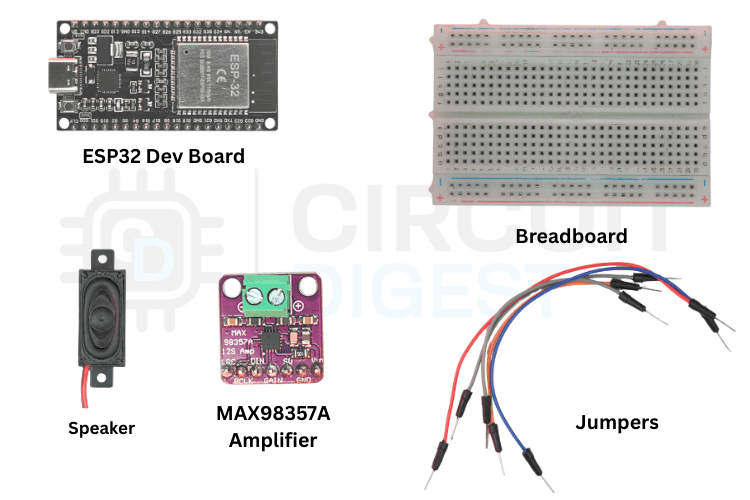
The image shows the list of components required for converting Text to Speech.
The table below shows the list of components to make the ESP32 speak
ESP32 to MAX98357A Circuit Diagram and Wiring
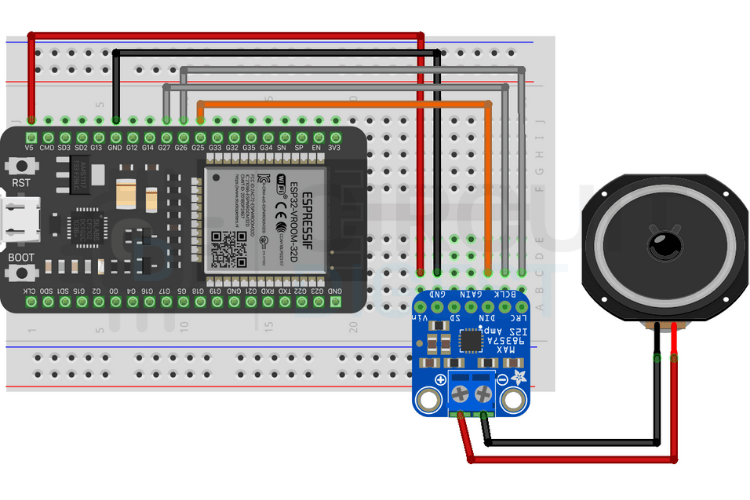
Follow the wiring layout below to connect your ESP32 to the I2S amplifier and speaker. Double-check your connections before powering up to avoid any short circuits. We have also completed projects using I2S audio communication that provide detailed setup guidance.
Pin Connection Table to Connect ESP32 with MAX98357A Amplifier
The pinout used in the library to make Text-to-Speech is given below
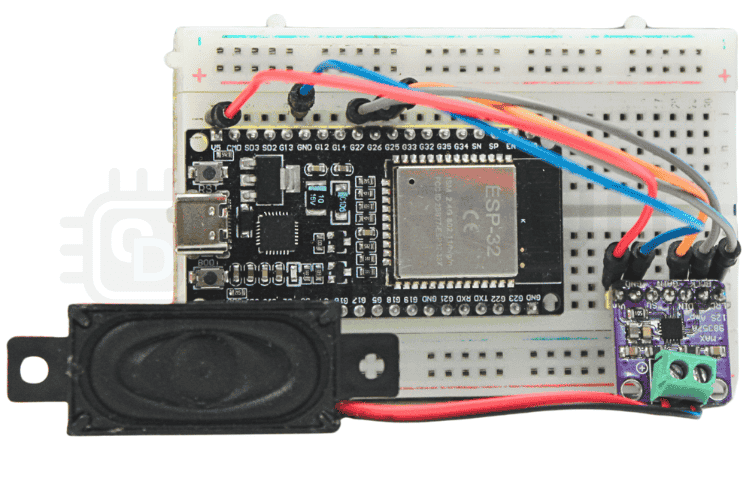
The image below shows the breadboard connection of the ESP32 microcontroller with the MAX98357A Amplifier
Setting Up Your Wit.ai Account for ESP32 Text to Speech
Before implementing the ESP32 text to speech library, you need to configure Wit.ai authentication. Follow these steps carefully:
⇒ Step 1: Create Your Account
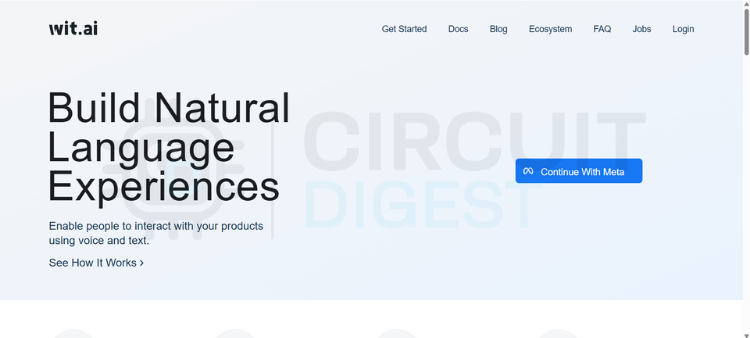
Go to the Wit.ai website and click to sign in through Meta. You'll have a few options for authentication, but email is the simplest and keeps things separate from your other accounts. Fill in your date of birth, create a password, and verify your email address with the six-digit code they send you. Once that's done, you're in.
⇒ Step 2: Create a New App
From the dashboard, you need to create a new app before you can perform any useful actions. This is where naming matters; pick something meaningful because this name will follow you through logs, training data, and integrations. Also, choose your language carefully, since it affects how well the system understands intents and extracts information.
⇒ Step 3: Get Your Server Access Token
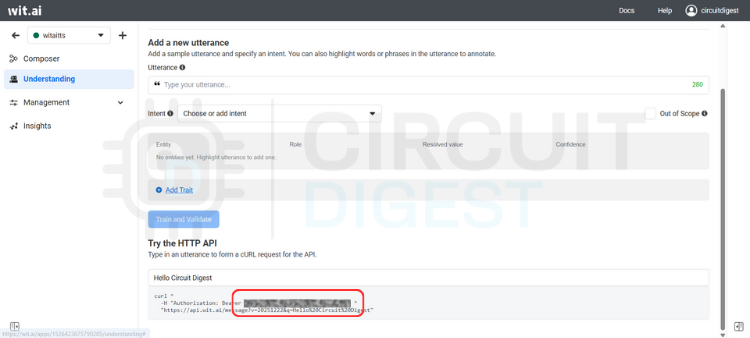
Navigate to the Management section and click on Settings. Look for the HTTP API section where you'll find your Server Access Token (it's listed as a Bearer token). This token is critical; it's how your application talks to Wit.ai.
⇒ Step 4: Secure Your Token
Copy the Server Access Token and store it somewhere safe. Avoid hardcoding it directly into your code or committing it to version control. Instead, use environment variables or a secure configuration system. Once you're running in production, avoid regenerating this token unless necessary.
⇒ Step 5: You're Ready
That's it. Your Wit.ai account is set up and ready to integrate with your embedded devices, backend services, or any other system you're building. You shouldn't need to touch these settings again unless something changes in your project.
Installing the WitAITTS Library for ESP32
Open Arduino IDE, go to the Library Manager icon on the left sidebar, type \"WitAITTS\" into the search bar, and click Install when it pops up.
The Output window shows whether the library is successfully installed or not.
Instead of writing everything from scratch, let's use the example sketch. Go to File > Examples > WitAITTS and select ESP32_Basic. This will open the ESP32-based example sketch.
Replace the YourWiFiSSID and YourWiFiPassword with the actual network details. Paste that Server Access Token you copied earlier into the YOUR_WIT_AI_TOKEN_HERE spot.
ESP32 Text to Speech Source Code Explanation
This program converts typed text into spoken audio by using an online text-to-speech service and playing the sound through an audio output on the board. The system depends on WiFi and a valid cloud token. When text is sent, the board requests speech from the server, receives digital audio, and plays it through the I2S interface. The design stays simple and blocking, which suits demos and maker projects.
The ESP32 is more capable than many other microcontrollers, but generating natural speech directly on the device is still not practical for real-world use. Because of this, cloud-based solutions are often used. The ESP32 sends text to an ESP32 Text to Speech online AI-based service, which converts the text into speech and sends the audio back. The ESP32 then plays the received sound through a speaker. This method allows text-to-speech conversion using ESP32 to work reliably, giving small devices a clear voice output without overloading the hardware or increasing system complexity. A similar concept has also been explored in an earlier project using Arduino based offline TTS approach with the Talkie library. The complete guide demonstrates the process of implementing ESP32 text to speech online using Wit.ai cloud AI service. The document explains all aspects of IoT voice output implementation through hardware setup demonstration, ESP32 TTS library usage, circuit connection details and complete code implementation. The AI Projects and Tutorials curates a variety of real-world AI and machine learning project guides like ESP32 voice systems, smart parking, and robot builds to help makers and engineers apply practical AI concepts.
What is ESP32 Text to Speech and Why Use AI-Based Solutions?
Why ESP32 Needs Cloud-Based TTS
Required Hardware Components
Circuit Diagram and Wiring
Pin Connection Table
Setting Up Your Wit.ai Account
Installing the WitAITTS Library
Understanding Audio Streaming and Playback Quality
└ Audio Streaming and Playback
└ Factors Affecting Playback Quality
What is ESP32 Text to Speech and Why Use AI-Based Solutions?
Text-to-speech may look simple, but it requires several important steps. Initially, the text is prepared for speech by converting numbers into words, expanding abbreviations, and making symbols into readable characters. For microcontroller projects, ESP32 text to speech using AI has become the preferred approach due to hardware limitations. Next, the system analyzes the text and divides it into individual speech sounds. It also determines how the voice should sound, including where to pause, which words to emphasize, and what tone to use, ensuring the spoken audio sounds natural. Following this, the processed speech is converted into digital audio and sent to the speaker for playback.
On computers, these steps occur quickly and efficiently. But microcontrollers such as the ESP32 have certain limitations. They lack sufficient memory to store large speech models, and their processors aren't fast enough to generate high-quality speech in real time. Also, they have limited storage space. Because of these challenges, a cloud-based ESP32 Text to Speech online approach is used. The main processing tasks are handled by remote servers, while the ESP32 simply sends the text and plays the received audio.
Why ESP32 Needs Cloud-Based TTS
Text-to-speech may appear simple, but it involves several important steps. First, the text is prepared for speech. Numbers are changed into words, abbreviations are expanded, and symbols are converted into readable text. Next, the system breaks the text into speech sounds and decides how the voice should sound. This includes pauses, emphasis, and tone so the speech feels natural. Finally, the processed speech is converted into digital audio and sent to a speaker for playback.
Natural-sounding voices powered by advanced AI algorithms
The ESP32 device uses very small memory resources for its operations.
The system works without any need for complex audio processing libraries, which run on local machines.
The system provides a scalable solution which supports commercial use cases.
The system receives automatic updates and improvements, which are managed from the server.
On computers, these steps happen quickly because there is enough memory and processing power. Microcontrollers like the ESP32 are more limited. They do not have enough memory to store large speech models, and their processors are not fast enough to create natural speech in real time. Storage space is also limited. Because of this, ESP32 Text to Speech using AI is commonly implemented through cloud-based services. In setups such as esp32 text to speech arduino, the ESP32 sends text to an online service that handles all speech processing. The generated audio is then returned to the ESP32 and played through a speaker, allowing speech output without overloading the device. These limitations make cloud-based ESP32 text to speech online services the optimal solution.
Understanding Text-to-Speech Technology for Microcontrollers
The ESP32 implementation of modern Text-to-Speech (TTS) has many different levels of complex processing during the TTS processing pipeline, including:
∗ Text Normalisation – Conversion of numeric to word representation, Abbreviation expansion and Representation of symbols as human-readable characters.
∗ Linguistic Analysis – Breaking down the text into multiple phonemes (speech sounds) and determining how each phoneme is to be pronounced according to the rules of Linguistics.
∗ Prosody Generation – Determining where to use natural pauses, how to stress specific words with variances in pitch and rhythm when speaking.
∗ Audio Synthesis – Transforming the processed Speech Data into a form that can be stored in a digital audio format.
∗ Audio Playback – Delivering the generated digital audio through the speakers on the ESP32.
Wit.ai is a cloud-based AI platform created by Meta Platforms, Inc. It provides speech and language processing through simple HTTP-based APIs. The platform supports features such as Text-to-Speech, Speech-to-Text, and basic language understanding. In an ESP32 text-to-speech library, this service is commonly used to convert text into spoken audio.
For Text-to-Speech, the process is straightforward. Text is sent to the Wit.ai servers using a secure HTTPS request with authentication. The service returns the generated speech in WAV or MPEG audio format. The audio can be streamed while it is being received, allowing playback to begin before the full file is downloaded, which results in smoother audio output.
Wit.ai offers a free usage tier that is suitable for learning, testing, and early-stage development. Request limits are applied, so applications that send frequent requests should be designed with these limits in mind. All speech processing and language analysis are handled on Wit.ai's servers. The ESP32 only sends text data and plays back the received audio. This separation allows an ESP32 TTS library to deliver speech features on low-power hardware without increasing system complexity.
Required Hardware Components for ESP32 Text to Speech Using AI
The image shows the list of components required for converting Text to Speech.
The table below shows the list of components to make the ESP32 speak
ESP32 to MAX98357A Circuit Diagram and Wiring
Follow the wiring layout below to connect your ESP32 to the I2S amplifier and speaker. Double-check your connections before powering up to avoid any short circuits. We have also completed projects using I2S audio communication that provide detailed setup guidance.
Pin Connection Table to Connect ESP32 with MAX98357A Amplifier
The pinout used in the library to make Text-to-Speech is given below
The image below shows the breadboard connection of the ESP32 microcontroller with the MAX98357A Amplifier
Setting Up Your Wit.ai Account for ESP32 Text to Speech
Before implementing the ESP32 text to speech library, you need to configure Wit.ai authentication. Follow these steps carefully:
⇒ Step 1: Create Your Account
Go to the Wit.ai website and click to sign in through Meta. You'll have a few options for authentication, but email is the simplest and keeps things separate from your other accounts. Fill in your date of birth, create a password, and verify your email address with the six-digit code they send you. Once that's done, you're in.
⇒ Step 2: Create a New App
From the dashboard, you need to create a new app before you can perform any useful actions. This is where naming matters; pick something meaningful because this name will follow you through logs, training data, and integrations. Also, choose your language carefully, since it affects how well the system understands intents and extracts information.
⇒ Step 3: Get Your Server Access Token
Navigate to the Management section and click on Settings. Look for the HTTP API section where you'll find your Server Access Token (it's listed as a Bearer token). This token is critical; it's how your application talks to Wit.ai.
⇒ Step 4: Secure Your Token
Copy the Server Access Token and store it somewhere safe. Avoid hardcoding it directly into your code or committing it to version control. Instead, use environment variables or a secure configuration system. Once you're running in production, avoid regenerating this token unless necessary.
⇒ Step 5: You're Ready
That's it. Your Wit.ai account is set up and ready to integrate with your embedded devices, backend services, or any other system you're building. You shouldn't need to touch these settings again unless something changes in your project.
Installing the WitAITTS Library for ESP32
Open Arduino IDE, go to the Library Manager icon on the left sidebar, type \"WitAITTS\" into the search bar, and click Install when it pops up.
The Output window shows whether the library is successfully installed or not.
Instead of writing everything from scratch, let's use the example sketch. Go to File > Examples > WitAITTS and select ESP32_Basic. This will open the ESP32-based example sketch.
Replace the YourWiFiSSID and YourWiFiPassword with the actual network details. Paste that Server Access Token you copied earlier into the YOUR_WIT_AI_TOKEN_HERE spot.
ESP32 Text to Speech Source Code Explanation
This program converts typed text into spoken audio by using an online text-to-speech service and playing the sound through an audio output on the board. The system depends on WiFi and a valid cloud token. When text is sent, the board requests speech from the server, receives digital audio, and plays it through the I2S interface. The design stays simple and blocking, which suits demos and maker projects.
Technologies used
Hardware components
- ESP32
- ESP8266
- Arduino
- DHT22
- Relay
- OLED
- NodeMCU
Software & tools
- Arduino IDE
- Blynk
- Firebase Console
- Node-RED
- MQTT Broker
Project demo video
What you get
- Working project / hardware kit, tested before delivery
- Complete source code with explanation
- Project demo and guidance for your viva
- Project report, PPT and IEEE paper support (on request)
Delivery & Payment
Delivery takes a minimum of two weeks from the date your inquiry is confirmed.
Payment is in two parts:
• 50% advance to start the project
• Remaining 50% before delivery
Note:
• Documentation and PPT are not included by default
• If you need documentation/PPT, it can be arranged for extra time and cost
We'll confirm the exact timeline and cost with you after reviewing your requirements.
Related IoT projects

IoT
DIY IoT Plant Watering System using Arduino
A remote plant-watering system that monitors soil moisture and lets you trigger a water pump from anywhere through the Blynk app, with LED-m...
View project
IoT
Build a smart mirror with an Arduino UNO Q
A wall-mounted smart mirror that shows the time, calendar, to-do list, room temperature/humidity and weather forecast behind a two-way glass...
View project
IoT
ESP32 Patient Health Monitor ECG SpO2 BPM Live Dashboard
Build a complete patient health monitoring system using ESP32 with AD8232 ECG sensor, MAX30102 pulse oximeter, BME280 and live web dashboard...
View project
IoT
IoT AC Energy Meter with PZEM-004T and ESP32 WebServer
Build an IoT-based AC energy meter using ESP32 and PZEM-004T to measure voltage, current, power, frequency and energy with live web dashboar...
View project