



Build a Real-Time GPS Tracker with Raspberry Pi Pico & SIM800L GSM Module
Learn how to build a Raspberry Pi Pico GPS Tracker using the Neo 6M GPS module and SIM800L. This hands-on guide covers interfacing, real-time data logging, and API-based location updates
- Suitable forB.Tech Embedded students
- Build time3-4 weeks
- LevelBeginner
- Available atAjvika Labs, Kakinada
About this project
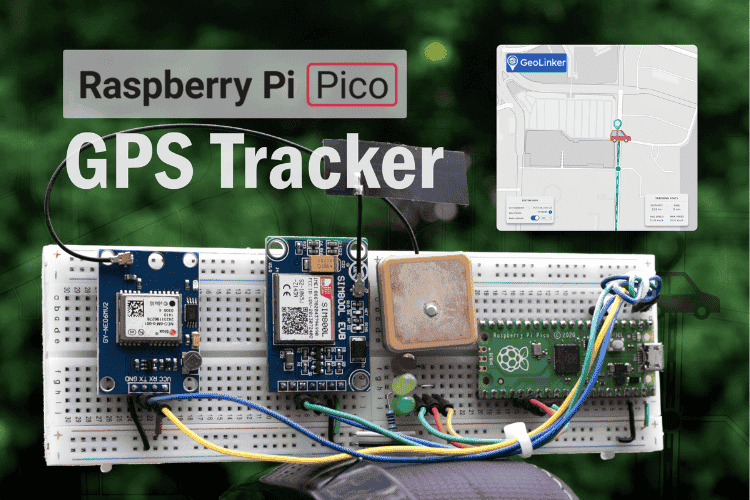
Building a real-time GPS tracker with Raspberry Pi Pico has never been more accessible thanks to affordable cellular communication modules and simplified programming libraries. This comprehensive Raspberry Pi Pico GPS tracker tutorial demonstrates how to create a professional-grade IoT tracking device using the SIM800L GSM module, Neo 6M GPS module with Raspberry Pi, and the versatile Raspberry Pi Pico microcontroller, similar to our ESP32 GPS Tracker and Arduino GPS Tracker that we have built earlier. This DIY GPS tracking system transmits precise location data over cellular networks, enabling real-time location monitoring from anywhere worldwide with minimal hardware investment.
This complete Raspberry Pi Pico GPS Tracker tutorial covers hardware setup, from circuit wiring and power management to real-time location data transmission. It is tailored for hobbyists, engineers, and educators looking to implement real-time location tracking in their IoT projects. Also, if you're interested in exploring more about Raspberry Pi projects, be sure to check out CircuitDigest. We have previously covered a lot of Raspberry Pi Pico and Raspberry Pi Zero Projects.
Real-Time GPS Tracker with Raspberry Pi Pico - Quick Overview
Build Time: 4-6 hours | Cost: $30-50 | Difficulty: Beginner-Intermediate
What You'll Learn: UART communication, GPS data parsing, GSM/HTTP transmission, and Offline data buffering
Applications: Vehicle tracking, Asset monitoring, Pet locator, Delivery logistics 4.1s
Understanding SIM800L and Neo-6M GPS Modules
Circuit Diagram & Wiring Guide
Complete Arduino Code
Testing Raspberry Pi Pico GPS Tracker
Required Components for Raspberry Pi Pico GPS Tracker
Raspberry Pi Pico / Pico W
Raspberry Pi Pico / Pico W
Microcontroller (RP2040)
Microcontroller (RP2040)
GSM/GPRS module for internet access
GSM/GPRS module for internet access
For GPS data Collection
For GPS data Collection
External GPS antenna with SMA/UFL
External GPS antenna with SMA/UFL
External GSM antenna
External GSM antenna
2G Capable SIM (Airtel)
2G Capable SIM (Airtel)
Jumper Wires, Breadboard
Jumper Wires, Breadboard
Warning: SIM800L is sensitive to voltage and requires a 3.7V - 4.2V regulated supply with sufficient current (~2A peak). If your module doesn't have a built-in regulator(LDO), always use a LiPo or a separate buck converter.
How Does the Raspberry Pi Pico GPS Tracker Work?
In this cellular GPS tracker with Raspberry Pi Pico project, we are building a compact and efficient GPS tracker that’s easy to implement both in hardware and software. At the core of the system is the Raspberry Pi Pico, a cost-effective microcontroller that coordinates data collection and transmission. For location tracking, we use the Neo-6M GPS module, which provides real-time latitude and longitude data via GPS satellites. To send this data to the cloud, we rely on the SIM800L GSM module, which transmits information over a cellular network using simple HTTP requests.
One of the standout features of this system is its ability to handle internet connectivity issues gracefully. When the cellular connection is lost, the tracker temporarily stores GPS data locally in a buffer. As soon as the connection is restored, the stored data is uploaded first, followed by any newly captured points. This ensures that no location data is lost, even when operating in areas with poor or intermittent network coverage. Overall, this makes the Pico GPS tracker a reliable solution for real-time location tracking with built-in fault tolerance.
Understanding SIM800L and Neo-6M GPS Modules
The SIM800L is a low-cost GSM/GPRS module designed for IoT tracking devices and embedded GPS solutions, making it ideal for DIY location monitoring projects. It operates on quad-band frequencies ( 850, 900, 1800, and 1900 MHz ), making it compatible with 2G networks worldwide. Its small form factor and UART-based communication make it ideal for microcontroller integration.
Key Features and Capabilities
⇒ Voice, SMS, and GPRS Data: The SIM800L can make and receive voice calls, send and receive SMS messages, and connect to the internet using GPRS. This makes it versatile for remote monitoring and alert-based systems.
⇒ TCP/UDP and HTTP Support: It supports TCP/IP stack and HTTP via AT commands, enabling interaction with web APIs or cloud databases.
⇒ AT Command Control: Controlled entirely via AT commands over UART. It responds to common commands like AT, AT+CSQ, AT+CREG?, AT+HTTPACTION, etc.
⇒ Low Power Modes: Offers various power-saving options, including sleep and idle states, for battery-powered projects.
⇒ Network Functions: Can scan for available networks, handle automatic or manual network registration, and report signal quality.
Hardware Considerations
⇒ Voltage Sensitivity: It must be powered with a stable supply of 3.7V to 4.2V, and it can draw up to 2A of current during transmission bursts.
⇒ Antenna: Requires an external GSM antenna for proper signal strength. Antenna types include PCB, helical, or SMA-based external ones.
⇒ Logic Levels: Operates at 2.8V to 3V logic level, but in our testing, it was able to withstand 3.3V on MCU Pins. Use a level shifter if you are using a standalone SIM800L IC.
The Neo-6M is a compact and cost-effective GPS receiver module developed by u-blox, designed specifically for tracking and navigation applications. It supports only the GPS (Global Positioning System) constellation. The setup() function initialises both UART interfaces for the Neo 6M GPS module with Raspberry Pi communication and SIM800L cellular connectivity.
The module is popular for its low power consumption, high positioning accuracy, and fast time-to-first-fix (TTFF). It communicates using standard NMEA 0183 sentences over a UART interface, typically at a default baud rate of 9600 bps. Due to its reliability and affordability, it's widely used in vehicle tracking systems, drones, robotics, and DIY navigation devices.
Key Features and Capabilities
⇒ NMEA 0183 Protocol Output: Continuously transmits GPS data such as time, latitude, longitude, altitude, number of satellites, speed, and fix quality via standard NMEA sentences like $GPGGA, $GPRMC, $GPGSV, and others.
⇒ High Sensitivity Receiver: Capable of acquiring weak satellite signals (-161 dBm tracking sensitivity), making it suitable for outdoor use with minimal obstruction.
⇒ Fast Time-to-First-Fix (TTFF): Supports hot, warm, and cold starts with TTFF as low as 1 second (hot) and 27 seconds (cold).
⇒ Position Accuracy: Offers 2.5m CEP positioning accuracy under clear sky conditions.
⇒ Backup Battery Support: Can be equipped with a coin cell to retain satellite data and RTC for faster startups.
Hardware Considerations
⇒ Antenna Requirements: Works best with an active GPS antenna for improved signal acquisition. Typically includes a UFL or SMA connector.
⇒ Power Supply: IC Operates at 3.3V and draws around 45–50 mA. Avoid powering from 5V directly if your module doesn't have a power regulator(LDO).
⇒ Status LED: Blinks when the module has acquired a valid fix, providing easy visual feedback.
Raspberry Pi Pico GPS Tracker Circuit Diagram & Wiring Guide
Receive from SIM800L
Receive from SIM800L
External battery or supply (3.7V - 4.2V)
External battery or supply (3.7V - 4.2V)
External battery or supply (3.6V)
External battery or supply (3.6V)
Note: Ensure that both the SIM800L and Neo-6M share a common ground with the Pico. Also, if your SIM800L & Neo-6M Modules have an inbuilt regulator(LDO), you can connect VCC directly to the 5V or VBUS pin in Pico.
Setting Up CircuitDigest Cloud & GeoLinker API
CircuitDigest Cloud is a powerful IoT and AI integration platform designed to support developers, engineers, and makers in rapidly prototyping and deploying intelligent embedded systems. It offers a suite of web-based services and APIs that simplify the process of adding connectivity, data visualisation, and intelligent automation to microcontroller and IoT projects.
Among its key offerings is the GeoLinker API, a cloud-based data ingestion and visualisation service specifically designed for GPS/GNSS-based devices. CircuitDigest Cloud also includes additional RESTful APIs such as QR Code Scanning, Automatic Number Plate Recognition, and SMS API, enabling seamless expansion into computer vision, authentication, and notification systems. These features allow users to build comprehensive IoT ecosystems from a single, unified interface.
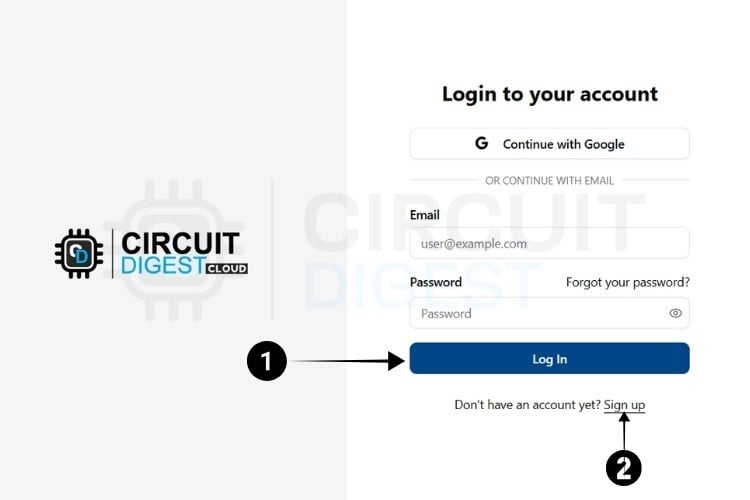
To begin using the GeoLinker API for real-time GPS data tracking and map visualisation, users must first register for an account on CircuitDigest Cloud and generate a unique API Key. This API Key acts as a secure authentication token, linking your embedded device (e.g., Raspberry Pi Pico) with the cloud backend. The process is simple and requires only a few steps:
Go to the official CircuitDigest Cloud website at https://circuitdigest.cloud. and in the top right corner, click Sign in.
If you are new to CircuitDigest Cloud, you need to register a new account by following the steps below.
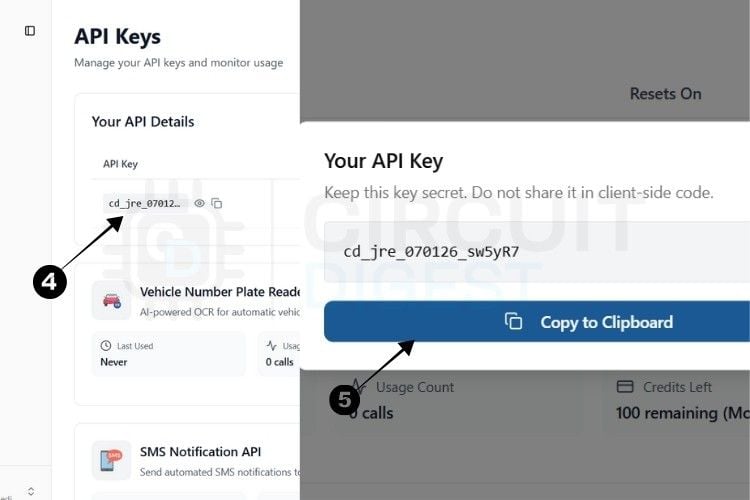
The next step is to generate the API Key.
⇒ Step 4: You will be directed to a page where you can generate your API Key.
⇒ Step 5: By pressing the copy icon near the API Key, your key gets instantly copied to the clipboard.
Currently, there is a usage limit of 100 requests per API key for both the SMS and ANPR APIs and 10,000 data points for GPS tracking. Once you reach this limit, you can generate another key, which provides an additional 100 uses.
This usage limit is in place to prevent server overload.
With this, we are ready to move to hardware.
* Note : A 10-second rate limit applies to all API calls, allowing one request every 10 seconds.
Indicates when the key will expire
Indicates when the key will expire
Shows the number of times the key has been used
Shows the number of times the key has been used
This complete Raspberry Pi Pico GPS Tracker tutorial covers hardware setup, from circuit wiring and power management to real-time location data transmission. It is tailored for hobbyists, engineers, and educators looking to implement real-time location tracking in their IoT projects. Also, if you're interested in exploring more about Raspberry Pi projects, be sure to check out CircuitDigest. We have previously covered a lot of Raspberry Pi Pico and Raspberry Pi Zero Projects.
Real-Time GPS Tracker with Raspberry Pi Pico - Quick Overview
Build Time: 4-6 hours | Cost: $30-50 | Difficulty: Beginner-Intermediate
What You'll Learn: UART communication, GPS data parsing, GSM/HTTP transmission, and Offline data buffering
Applications: Vehicle tracking, Asset monitoring, Pet locator, Delivery logistics 4.1s
Understanding SIM800L and Neo-6M GPS Modules
Circuit Diagram & Wiring Guide
Complete Arduino Code
Testing Raspberry Pi Pico GPS Tracker
Required Components for Raspberry Pi Pico GPS Tracker
Raspberry Pi Pico / Pico W
Raspberry Pi Pico / Pico W
Microcontroller (RP2040)
Microcontroller (RP2040)
GSM/GPRS module for internet access
GSM/GPRS module for internet access
For GPS data Collection
For GPS data Collection
External GPS antenna with SMA/UFL
External GPS antenna with SMA/UFL
External GSM antenna
External GSM antenna
2G Capable SIM (Airtel)
2G Capable SIM (Airtel)
Jumper Wires, Breadboard
Jumper Wires, Breadboard
Warning: SIM800L is sensitive to voltage and requires a 3.7V - 4.2V regulated supply with sufficient current (~2A peak). If your module doesn't have a built-in regulator(LDO), always use a LiPo or a separate buck converter.
How Does the Raspberry Pi Pico GPS Tracker Work?
In this cellular GPS tracker with Raspberry Pi Pico project, we are building a compact and efficient GPS tracker that’s easy to implement both in hardware and software. At the core of the system is the Raspberry Pi Pico, a cost-effective microcontroller that coordinates data collection and transmission. For location tracking, we use the Neo-6M GPS module, which provides real-time latitude and longitude data via GPS satellites. To send this data to the cloud, we rely on the SIM800L GSM module, which transmits information over a cellular network using simple HTTP requests.
One of the standout features of this system is its ability to handle internet connectivity issues gracefully. When the cellular connection is lost, the tracker temporarily stores GPS data locally in a buffer. As soon as the connection is restored, the stored data is uploaded first, followed by any newly captured points. This ensures that no location data is lost, even when operating in areas with poor or intermittent network coverage. Overall, this makes the Pico GPS tracker a reliable solution for real-time location tracking with built-in fault tolerance.
Understanding SIM800L and Neo-6M GPS Modules
The SIM800L is a low-cost GSM/GPRS module designed for IoT tracking devices and embedded GPS solutions, making it ideal for DIY location monitoring projects. It operates on quad-band frequencies ( 850, 900, 1800, and 1900 MHz ), making it compatible with 2G networks worldwide. Its small form factor and UART-based communication make it ideal for microcontroller integration.
Key Features and Capabilities
⇒ Voice, SMS, and GPRS Data: The SIM800L can make and receive voice calls, send and receive SMS messages, and connect to the internet using GPRS. This makes it versatile for remote monitoring and alert-based systems.
⇒ TCP/UDP and HTTP Support: It supports TCP/IP stack and HTTP via AT commands, enabling interaction with web APIs or cloud databases.
⇒ AT Command Control: Controlled entirely via AT commands over UART. It responds to common commands like AT, AT+CSQ, AT+CREG?, AT+HTTPACTION, etc.
⇒ Low Power Modes: Offers various power-saving options, including sleep and idle states, for battery-powered projects.
⇒ Network Functions: Can scan for available networks, handle automatic or manual network registration, and report signal quality.
Hardware Considerations
⇒ Voltage Sensitivity: It must be powered with a stable supply of 3.7V to 4.2V, and it can draw up to 2A of current during transmission bursts.
⇒ Antenna: Requires an external GSM antenna for proper signal strength. Antenna types include PCB, helical, or SMA-based external ones.
⇒ Logic Levels: Operates at 2.8V to 3V logic level, but in our testing, it was able to withstand 3.3V on MCU Pins. Use a level shifter if you are using a standalone SIM800L IC.
The Neo-6M is a compact and cost-effective GPS receiver module developed by u-blox, designed specifically for tracking and navigation applications. It supports only the GPS (Global Positioning System) constellation. The setup() function initialises both UART interfaces for the Neo 6M GPS module with Raspberry Pi communication and SIM800L cellular connectivity.
The module is popular for its low power consumption, high positioning accuracy, and fast time-to-first-fix (TTFF). It communicates using standard NMEA 0183 sentences over a UART interface, typically at a default baud rate of 9600 bps. Due to its reliability and affordability, it's widely used in vehicle tracking systems, drones, robotics, and DIY navigation devices.
Key Features and Capabilities
⇒ NMEA 0183 Protocol Output: Continuously transmits GPS data such as time, latitude, longitude, altitude, number of satellites, speed, and fix quality via standard NMEA sentences like $GPGGA, $GPRMC, $GPGSV, and others.
⇒ High Sensitivity Receiver: Capable of acquiring weak satellite signals (-161 dBm tracking sensitivity), making it suitable for outdoor use with minimal obstruction.
⇒ Fast Time-to-First-Fix (TTFF): Supports hot, warm, and cold starts with TTFF as low as 1 second (hot) and 27 seconds (cold).
⇒ Position Accuracy: Offers 2.5m CEP positioning accuracy under clear sky conditions.
⇒ Backup Battery Support: Can be equipped with a coin cell to retain satellite data and RTC for faster startups.
Hardware Considerations
⇒ Antenna Requirements: Works best with an active GPS antenna for improved signal acquisition. Typically includes a UFL or SMA connector.
⇒ Power Supply: IC Operates at 3.3V and draws around 45–50 mA. Avoid powering from 5V directly if your module doesn't have a power regulator(LDO).
⇒ Status LED: Blinks when the module has acquired a valid fix, providing easy visual feedback.
Raspberry Pi Pico GPS Tracker Circuit Diagram & Wiring Guide
Receive from SIM800L
Receive from SIM800L
External battery or supply (3.7V - 4.2V)
External battery or supply (3.7V - 4.2V)
External battery or supply (3.6V)
External battery or supply (3.6V)
Note: Ensure that both the SIM800L and Neo-6M share a common ground with the Pico. Also, if your SIM800L & Neo-6M Modules have an inbuilt regulator(LDO), you can connect VCC directly to the 5V or VBUS pin in Pico.
Setting Up CircuitDigest Cloud & GeoLinker API
CircuitDigest Cloud is a powerful IoT and AI integration platform designed to support developers, engineers, and makers in rapidly prototyping and deploying intelligent embedded systems. It offers a suite of web-based services and APIs that simplify the process of adding connectivity, data visualisation, and intelligent automation to microcontroller and IoT projects.
Among its key offerings is the GeoLinker API, a cloud-based data ingestion and visualisation service specifically designed for GPS/GNSS-based devices. CircuitDigest Cloud also includes additional RESTful APIs such as QR Code Scanning, Automatic Number Plate Recognition, and SMS API, enabling seamless expansion into computer vision, authentication, and notification systems. These features allow users to build comprehensive IoT ecosystems from a single, unified interface.
To begin using the GeoLinker API for real-time GPS data tracking and map visualisation, users must first register for an account on CircuitDigest Cloud and generate a unique API Key. This API Key acts as a secure authentication token, linking your embedded device (e.g., Raspberry Pi Pico) with the cloud backend. The process is simple and requires only a few steps:
Go to the official CircuitDigest Cloud website at https://circuitdigest.cloud. and in the top right corner, click Sign in.
If you are new to CircuitDigest Cloud, you need to register a new account by following the steps below.
The next step is to generate the API Key.
⇒ Step 4: You will be directed to a page where you can generate your API Key.
⇒ Step 5: By pressing the copy icon near the API Key, your key gets instantly copied to the clipboard.
Currently, there is a usage limit of 100 requests per API key for both the SMS and ANPR APIs and 10,000 data points for GPS tracking. Once you reach this limit, you can generate another key, which provides an additional 100 uses.
This usage limit is in place to prevent server overload.
With this, we are ready to move to hardware.
* Note : A 10-second rate limit applies to all API calls, allowing one request every 10 seconds.
Indicates when the key will expire
Indicates when the key will expire
Shows the number of times the key has been used
Shows the number of times the key has been used
Technologies used
Hardware components
- ESP32
- Arduino
- Raspberry Pi
- MPU
- LED
- Module
- Board
- GPS
- GSM
- SIM800
- PCB
- Battery
- NEO-6M
Project demo video
What you get
- Working project / hardware kit, tested before delivery
- Complete source code with explanation
- Project demo and guidance for your viva
- Project report, PPT and IEEE paper support (on request)
Delivery & Payment
Delivery takes a minimum of two weeks from the date your inquiry is confirmed.
Payment is in two parts:
• 50% advance to start the project
• Remaining 50% before delivery
Note:
• Documentation and PPT are not included by default
• If you need documentation/PPT, it can be arranged for extra time and cost
We'll confirm the exact timeline and cost with you after reviewing your requirements.
Related Embedded projects

Embedded
ESP32 Fingerprint Attendance System with Live Web Dashboard
Build a biometric attendance system using ESP32 with AS608 fingerprint sensor that logs attendance with timestamp to web dashboard and Googl...
View project
Embedded
Mars Rover Robot Replica using ESP32 CAM and Arduino
Build a Mars Rover robot replica using ESP32-CAM and Arduino with a rocker-bogie suspension system, live video streaming, and smartphone app...
View project
Embedded
ESP32 CAN Bus Tutorial Interfacing MCP2515 with ESP32
Learn CAN bus communication with ESP32 and MCP2515 CAN controller to send and receive data in automotive and industrial applications.
View project
Embedded
ESP32 MP3 Music Player with SD Card and I2S Amplifier
Build a standalone ESP32 MP3 music player that reads audio from SD card and outputs high-quality audio via I2S DAC amplifier with web contro...
View project