Analogue Clock Using MATLAB
Here we design an Analogue clock using MATLAB. The coding is developed using MATLAB version 7.9.0.529. Make it for yourself now...
- Suitable forB.Tech Embedded students
- Build time3-4 weeks
- LevelAdvanced
- Available atAjvika Labs, Kakinada
About this project
NASA might get a fancy digital-count display and retire the analogue clock from Apollo era but the passion for the analogue clock does not end. An analogue clock has moving hands, where the smaller one is the hours hand and travels 30° in one hour, and the longer one is the minutes hand and travels 360° in an hour. The seconds hand rotates with a step of 6°. Here we look to design an analogue clock using MATLAB.
The coding is developed using MATLAB version 7.9.0.529 (or R2009b). MATLAB has a good collection of graphics commands for plotting and analysing complex signals. The built-in functions reduce the size of the program and provide the desired output.
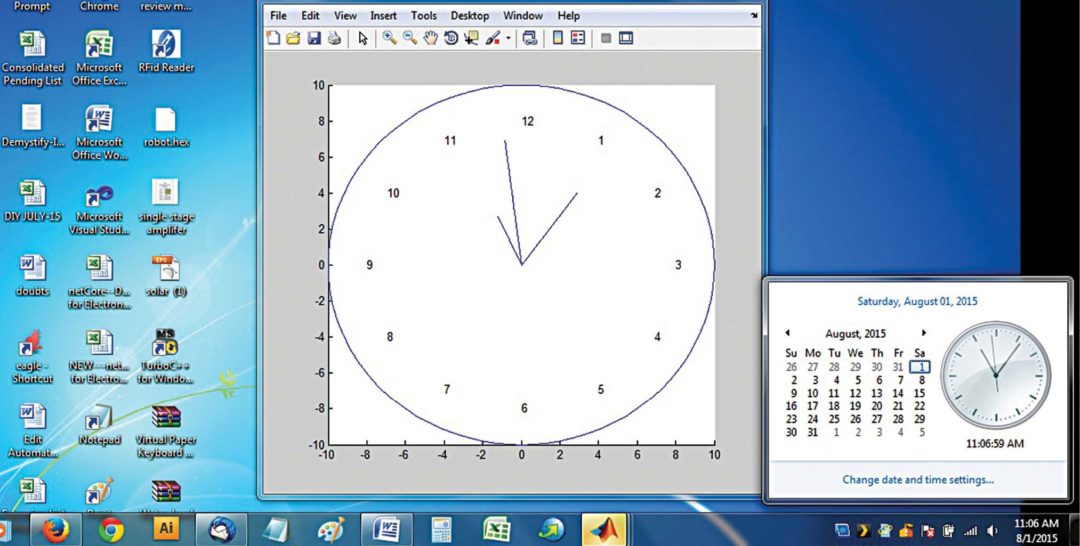
Circle with a radius of 10 units is drawn. Hours are marked from 1 to 12, 30° apart. System time such as your PC’s is read by the command. According to the current time of your PC, the hours, minutes and seconds hands are displayed.
The figure shows the screenshot of the program output. Commands used in the program for the analogue clock display are given below: clock( ). This command extracts date, year and current time from the real-time system. pause ( ). It provides the required time delay in seconds. clc( ). It clears the command window. clear( ). It clears all variables. textxy ( ). This command prints the text in the specified location, which is mentioned as x and y coordinates. numtostr( ). It converts a number to string data type.
Feel interested? Check out other matlab projects .
naveen February 15, 2017 At 3:01 pm its good,i wanted know much detail will u explain Log in to leave a comment EFY Team March 16, 2017 At 3:35 pm Dear Naveen, all the required information regarding this project is already present within the article. Log in to leave a comment
its good,i wanted know much detail will u explain
EFY Team March 16, 2017 At 3:35 pm Dear Naveen, all the required information regarding this project is already present within the article. Log in to leave a comment
Dear Naveen, all the required information regarding this project is already present within the article.
ferdoos April 16, 2017 At 9:26 pm i want the source code of it.but it is not downloaded Log in to leave a comment EFY Team April 17, 2017 At 10:22 am Hi Ferdoos, Please refresh the page or check your interne connection. We have checked from our side and there is no problem in downloading the source file. Log in to leave a comment
i want the source code of it.but it is not downloaded
EFY Team April 17, 2017 At 10:22 am Hi Ferdoos, Please refresh the page or check your interne connection. We have checked from our side and there is no problem in downloading the source file. Log in to leave a comment
Hi Ferdoos, Please refresh the page or check your interne connection. We have checked from our side and there is no problem in downloading the source file.
EFY Team June 25, 2017 At 8:04 pm Kindly elaborate your query. Log in to leave a comment
farhan September 13, 2017 At 11:47 am i want english code Log in to leave a comment
rehan October 5, 2017 At 10:16 pm thanks a lot Log in to leave a comment
faisal ali October 12, 2017 At 1:24 pm code is not showing kindly mail me at: [email protected] Log in to leave a comment
code is not showing kindly mail me at: [email protected]
Shivani October 29, 2017 At 1:23 pm Plž send me a souřce code [email protected] Log in to leave a comment
Plž send me a souřce code [email protected]
EFY Team November 3, 2017 At 5:35 pm The source code is present within the article. Log in to leave a comment
The source code is present within the article.
Dhinesh January 3, 2018 At 7:54 pm What are the applications of analog clock using matlab????If we simulate analog clock using matlab, where it could be used???why can’t we do this in c or c++???Is there any special in matlab??? Log in to leave a comment
What are the applications of analog clock using matlab????If we simulate analog clock using matlab, where it could be used???why can’t we do this in c or c++???Is there any special in matlab???
Mathis December 21, 2018 At 3:54 pm Is it possible to have more explanations about the code please ? Log in to leave a comment
Is it possible to have more explanations about the code please ?
Ethan May 8, 2019 At 4:27 am Hi, I’m having trouble viewing the source code in MATLAB, how would I do this? Log in to leave a comment EFY Team May 10, 2019 At 12:59 pm Kindly refresh the page and redownload. Log in to leave a comment
Hi, I’m having trouble viewing the source code in MATLAB, how would I do this?
EFY Team May 10, 2019 At 12:59 pm Kindly refresh the page and redownload. Log in to leave a comment
Kindly refresh the page and redownload.
Vyshnavi September 3, 2019 At 8:14 pm Can u plz send source code to mail id: [email protected] . I It’s getting prblm while downloading Log in to leave a comment EFY Team September 5, 2019 At 3:13 pm Hi Vyshnavi, could you please explain the problem in detail? Log in to leave a comment
Can u plz send source code to mail id: [email protected] . I It’s getting prblm while downloading
EFY Team September 5, 2019 At 3:13 pm Hi Vyshnavi, could you please explain the problem in detail? Log in to leave a comment
Hi Vyshnavi, could you please explain the problem in detail?
Sandeep Gooda September 19, 2019 At 4:00 pm can we have matlab code for this Please Log in to leave a comment
can we have matlab code for this Please
asha February 19, 2020 At 6:31 pm sir could you please send me a source code [email protected] Log in to leave a comment EFY Team February 24, 2020 At 4:41 pm Hi Asha, the source code can be downloaded from the end of the article. Log in to leave a comment
sir could you please send me a source code [email protected]
EFY Team February 24, 2020 At 4:41 pm Hi Asha, the source code can be downloaded from the end of the article. Log in to leave a comment
Hi Asha, the source code can be downloaded from the end of the article.
SHARE YOUR THOUGHTS & COMMENTS Register or Login to leave a comment.
Smart Speed Monitoring System For Road Safety
Real-Time Face Tracking Using Raspberry Pi 4 Versus Raspberry Pi 5 With Hailo-8L
High-Voltage Capacitor Discharger
Real-time Web-based Home Automation
World’s Smallest Open-Source LoRa + GPS Module for Wearables and IoT (Only 3cm!)
Smallest Spy Video Streaming Camera
Wirelessly Control Multiple AC Appliances with Web Interface
Ultra-Low-Loss Isolated Current Sensor
STMicroelectronics has Introduced First Automotive Microcontroller With built-in AI Acceleration
Samsung Launched 200MP Image Sensor Called ISOCELL HP5
Aeva Introduced 4D LiDAR Sensor for Physical AI Systems
Battery-Free In-Tire Sensors For Autonomous Vehicles
AI Method Explains Model Predictions
Negative Light Enables Hidden Data Transfer
Blockchain Black Box For Drones
DIY: Audio Signal–Controlled LED Display Using LM3914
State Reduction In Sequential Circuits
Make Your Own Musical Temperature Alarm
Technologies used
Hardware components
- Raspberry Pi
- LED
- Sensor
- Module
- Capacitor
- Battery
- Camera
- GPS
- LoRa
- RF
Software & tools
- MATLAB
- Git
What you get
- Working project / hardware kit, tested before delivery
- Complete source code with explanation
- Project demo and guidance for your viva
- Project report, PPT and IEEE paper support (on request)
Delivery & Payment
Delivery takes a minimum of two weeks from the date your inquiry is confirmed.
Payment is in two parts:
• 50% advance to start the project
• Remaining 50% before delivery
Note:
• Documentation and PPT are not included by default
• If you need documentation/PPT, it can be arranged for extra time and cost
We'll confirm the exact timeline and cost with you after reviewing your requirements.
Related Embedded projects

Embedded
ESP32 Fingerprint Attendance System with Live Web Dashboard
Build a biometric attendance system using ESP32 with AS608 fingerprint sensor that logs attendance with timestamp to web dashboard and Googl...
View project
Embedded
Mars Rover Robot Replica using ESP32 CAM and Arduino
Build a Mars Rover robot replica using ESP32-CAM and Arduino with a rocker-bogie suspension system, live video streaming, and smartphone app...
View project
Embedded
ESP32 CAN Bus Tutorial Interfacing MCP2515 with ESP32
Learn CAN bus communication with ESP32 and MCP2515 CAN controller to send and receive data in automotive and industrial applications.
View project
Embedded
ESP32 MP3 Music Player with SD Card and I2S Amplifier
Build a standalone ESP32 MP3 music player that reads audio from SD card and outputs high-quality audio via I2S DAC amplifier with web contro...
View project