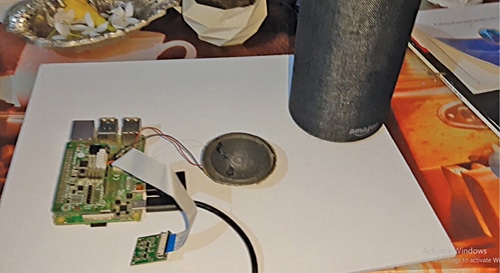
AI Camera For Tracking Suspicious Activities
A smart AI camera that could detect any suspicious activity and automatically trigger an alarm to call the police.
- Suitable forB.Tech Embedded students
- Build time3-4 weeks
- LevelIntermediate
- Available atAjvika Labs, Kakinada
About this project
Tracking and detecting suspicious activities is one of the most demanding tasks for security personnel and systems. If a security system fails in a place like an airport or bank, criminals can rob at gunpoint. Out of fear, the victims are usually unable to call the police in time for help.
But if a smart camera could detect any suspicious activity and automatically trigger an alarm to call the police, such criminal acts are likely to reduce significantly. So, let’s see how to build an AI camera system to track suspicious activities.
Create a machine learning ( ML ) model having datasets of normal activities, such as walking, talking, reading, and sitting. Feed the datasets of suspicious activities like fighting, boxing, pointing a gun, or any other violent movement deemed suspicious, into the ML model.
Perform the above-mentioned activities in front of the smart camera so that various movements are captured. This will help train the ML model and deploy it on Raspberry Pi as a smart artificial intelligence (AI) camera.
Several flexible options exist, such as TensorFlow, Google Teachable, Edge Impulse, and Lobeo to create and train an ML model. Any of these can be chosen for the project. To demonstrate, Google Teachable is being used here.
In Google Teachable, select the PoseNet option for tracking Correctly various body movements and actions. Correctly label the actions performed earlier of walking, talking, eating, standing, etc. Feed these datasets into the ML model. Similarly, correctly label and feed the datasets of activities like pointing guns, firing guns, fighting, beating, etc.
After feeding the required datasets, click on Train Model. The option to export the ML model or upload it to the cloud will appear. Uploaded the ML model to the cloud to safely store it there and let users access and deploy it anywhere in the world.
On uploading to the cloud, you will receive a URL for using the ML model. The URL of the ML model was created by the author.
Deploy the ML model on the camera and connect a speaker so that the Raspberry Pi triggers an alarm when any suspicious activity gets detected.
Suspicious Activity Tracking AI Camera – Coding
To deploy the ML model in Raspberry Pi coding is required. While uploading the ML model you would have received an example code snippet. Please copy and paste it into your JavaScript (JS) code. JS coding and testing can be done with the help of any code editor, offline or online. You can name the camera in HTML for the ML model.
Import the ML model that was previously uploaded to the cloud. Then check whether activities such as beating, gun firing, and gun possession are detected by the ML model during video processing.
The model gives the likelihood of a particular activity to occur in the range of 0.00 to 1.00. So, by using an ‘if’ condition, if the output is greater than 0.98 then it means a person is either pointing a gun or fighting. At this point, an alarm gets triggered to alert people nearby.
Save the JavaScript code as .html and open it in any browser with JavaScript enabled. Click on the Start button and perform the suspicious activity in front of the camera. The ML model will try to recognize it and, if found unusual, will issue an alert. You can also add functions for automatically calling or messaging the police.
Sometimes Chrome on Raspberry Pi is unable to open or access the camera and it hangs. In such a case try installing the latest version of Chrome or switch to another browser like Firefox or use an online/offline .js compiler. If the problem persists, you can use the URL of the trained ML model and directly see the output using the URL .
You can also use the Files option and upload if the browser is unable to access the camera to test the ML model you have created in Rpi.
Recommended: Top AI Engineering Projects .
Ashwini Kumar Sinha is a technology enthusiast
nithim February 17, 2024 At 9:58 pm Can we do the same project with rasperry pi 2 board. If yes what is the code for that. and what would be the success rate of that. Log in to leave a comment
Can we do the same project with rasperry pi 2 board. If yes what is the code for that. and what would be the success rate of that.
Ashwini Sinha February 19, 2024 At 2:15 pm Not sure , Check the ode will be same you only ed to open the html file in web browser Log in to leave a comment
Not sure , Check the ode will be same you only ed to open the html file in web browser
SHARE YOUR THOUGHTS & COMMENTS Register or Login to leave a comment.
Smart Speed Monitoring System For Road Safety
Real-Time Face Tracking Using Raspberry Pi 4 Versus Raspberry Pi 5 With Hailo-8L
High-Voltage Capacitor Discharger
Real-time Web-based Home Automation
World’s Smallest Open-Source LoRa + GPS Module for Wearables and IoT (Only 3cm!)
Smallest Spy Video Streaming Camera
Wirelessly Control Multiple AC Appliances with Web Interface
Ultra-Low-Loss Isolated Current Sensor
STMicroelectronics has Introduced First Automotive Microcontroller With built-in AI Acceleration
Samsung Launched 200MP Image Sensor Called ISOCELL HP5
Aeva Introduced 4D LiDAR Sensor for Physical AI Systems
Blockchain Black Box For Drones
Integrated EV Drive For Higher Power Density
Hybrid Cooling System Targets Power Efficiency
Electric Field Tunes Heat Transport In Solids
DIY: Audio Signal–Controlled LED Display Using LM3914
State Reduction In Sequential Circuits
Make Your Own Musical Temperature Alarm
Buck Converter vs Linear Voltage Regulator
Ultra-Compact RGB LED For Space-Constrained Designs
Compact Varistors For High Surge Protection
Gold Plated Reed Relays For High Voltage Systems
28nm Automotive MCU For Zonal E/E Architectures
DSP / Audio Firmware Engineer (Intern) At Chordy.ai In Bengaluru
JOB: System Engineer At General Electric In Chennai
JOB: Analog Layout Engineer At Accenture In Bengaluru
JOB: HVDC HMI Engineer At Quest Global In Bengaluru
Circuit Design Calculators for Engineers and Students
Broadside Coupled Stripline Impedance Calculator
Edge Coupled Stripline Impedance Calculator
Asymmetric Stripline Impedance Calculator
Technologies used
Hardware components
- Raspberry Pi
- Relay
- MPU
- LED
- Button
- Switch
- Sensor
- Module
- Board
- Capacitor
- Speaker
- Camera
- GPS
- LoRa
- RF
Software & tools
- TensorFlow
Project demo video
What you get
- Working project / hardware kit, tested before delivery
- Complete source code with explanation
- Project demo and guidance for your viva
- Project report, PPT and IEEE paper support (on request)
Delivery & Payment
Delivery takes a minimum of two weeks from the date your inquiry is confirmed.
Payment is in two parts:
• 50% advance to start the project
• Remaining 50% before delivery
Note:
• Documentation and PPT are not included by default
• If you need documentation/PPT, it can be arranged for extra time and cost
We'll confirm the exact timeline and cost with you after reviewing your requirements.
Related Embedded projects

Embedded
ESP32 Fingerprint Attendance System with Live Web Dashboard
Build a biometric attendance system using ESP32 with AS608 fingerprint sensor that logs attendance with timestamp to web dashboard and Googl...
View project
Embedded
Mars Rover Robot Replica using ESP32 CAM and Arduino
Build a Mars Rover robot replica using ESP32-CAM and Arduino with a rocker-bogie suspension system, live video streaming, and smartphone app...
View project
Embedded
ESP32 CAN Bus Tutorial Interfacing MCP2515 with ESP32
Learn CAN bus communication with ESP32 and MCP2515 CAN controller to send and receive data in automotive and industrial applications.
View project
Embedded
ESP32 MP3 Music Player with SD Card and I2S Amplifier
Build a standalone ESP32 MP3 music player that reads audio from SD card and outputs high-quality audio via I2S DAC amplifier with web contro...
View project